


On this page
Where to find the fax number
Use the most recent source you have, preferably one that comes from the recipient. Starting with the most reliable:
- The letter or notice you’re answering. If it prints a fax number, use that one, even if the organization lists others. For a CP2000 notice, for example, the IRS asks you to fax your response to the location shown at the top left of the notice, and each of its seven locations has its own toll-free fax number.
- The form’s current instructions. An agency’s fax number can be meant for one form only, and it can depend on where you live: the IRS, for example, uses different fax numbers for Form 2848 depending on the taxpayer’s state. It also notes that its numbers can change without notice, so read the current instructions rather than a copy you saved last year.
- The organization’s website. Look on the contact page, in the footer, or on the page about the process you’re dealing with. For a government agency, make sure you’re on its official site: only verified US government organizations can get a .gov domain, while anyone can register a .com, .org or .us address.
- The right office. A large organization can have many fax numbers. Social Security, for example, gives each local office’s fax number in its online office locator, which you search by ZIP code. How to find your Social Security office’s fax number walks through it.
- Directories and old paperwork. A number from an online directory, an old letterhead or your phone’s contacts may be out of date. Check it against the organization’s website or a recent letter before you fax anything personal.
- Ask. If you can’t find a fax number, call the main line or send an email, and ask which fax number to use and which office it reaches. Even with a number in hand, a quick call is worth it the first time you fax someone.
The agency guides on this site list official fax numbers and where each one is published: the IRS, Social Security, the VA and state unemployment agencies, and the DMV. For an insurer, see how to fax insurance documents.
Be wary of a fax number that comes in an unexpected call, email or text. The FTC says government agencies never contact people that way to ask for money or personal information, and it recommends reaching the agency at a number you know is correct.
Looking for a fax number of your own, so people can fax you? FaxTonic only sends faxes, and it doesn’t give you a number.
How to tell it’s a fax number
In the United States, a fax number looks exactly like a phone number: a 3-digit area code followed by a 7-digit number. On paper, only the label tells them apart: “Fax” (or just “F”) for the fax line, “Phone” or “Tel.” (or “P”) for the phone. The two can differ by just the last digit or two, as in (202) 555-0100 and (202) 555-0101, so copy the right line.
The digits won’t tell you whether a number belongs to a cell phone, either. A US cell number looks like any other number, and a cell phone can’t receive a fax. If the number you were given could be a cell number, ask. The cell phone guide explains why.
To be sure a fax machine is on the line, call the number from a phone before you send. Brother’s advice for a fax that won’t go through to one particular number is to check that it answers with fax tones. If you hear a voice or a voicemail greeting instead, see what to do when a fax doesn’t go through.
How to type a US fax number
In FaxTonic, choose United States under “Country”. The number field then shows +1 in front, and the hint under it starts with “Type the number without the country code (United States: +1).” Type the 10 digits, area code first. Spaces, dashes, dots and parentheses don’t matter, and if you type the 1 or +1 anyway, FaxTonic still reads the number correctly.
| Written as | What to type |
|---|---|
| (202) 555-0123 | As written, or 2025550123 |
| 202.555.0123 or 202-555-0123 | As written |
| 1-202-555-0123 or +1 202 555 0123 | 202-555-0123 (as written works too) |
| 555-0123, with no area code | The full number, area code included, like 202-555-0123 |
| A toll-free number: 1, then 800 and seven digits | The 800 and the seven digits (the 1 is optional) |
| 202-555-0123 ext. 12 | Ask for a direct fax number instead |
- Always include the area code, even for a fax across town. Without it, FaxTonic shows “This number seems to be missing digits for the country you picked (United States).”
- Don’t add a 9. Some office and hotel phone systems make you dial a prefix, such as 9, before an outside number. FaxTonic doesn’t dial through a phone system like that, so the number starts with the area code. With an extra digit in front, you’ll see “This number has too many digits for the country you picked (United States). Check it, and leave out any international prefix such as 00 or 011.”
- Type digits only. If you paste “Fax: 202-555-0123” from a website, the field may still show a check mark, but FaxTonic refuses the number when you click “Get the total”, with “This isn’t a fax number we recognize.”
- No extensions. FaxTonic refuses a number typed with “ext.”, “x” or “#” when you click “Get the total”, and tells you why: “A fax can’t dial an extension. Ask for the fax line’s own number.” Ask the recipient for a number that goes straight to the fax machine.
- Check the number before you pay. In the “Check and pay” step, it appears under “Fax number” in international format: 202-555-0123 becomes +1 202 555 0123. The cover page prints it the same way.
Every US number has 10 digits, so a missing or extra digit gets an error before you pay. A wrong digit doesn’t: FaxTonic can’t tell whether a valid number is the one you meant. If no fax machine answers at that number, the fax fails and we refund the price minus a fee of $0.30 + 2.9% (the whole price only if our fax provider refuses the fax when we submit it). If someone else’s fax machine answers and takes the pages, the fax counts as delivered and isn’t refunded. So compare the number with your source, digit by digit.
Toll-free numbers, cell numbers and other special cases
- Toll-free numbers start with 800, 888, 877, 866, 855, 844 or 833. The FCC points out that these codes aren’t interchangeable: the same seven digits reach a different recipient after 800 than after 888, so copy the code exactly. Agencies use them for faxes too, like the IRS numbers mentioned above. FaxTonic accepts toll-free fax numbers, but “toll-free” only means the call is free for someone dialing from a landline: FaxTonic still charges $1.49 a page.
- Cell numbers get through FaxTonic’s check, as explained above, and the fax then fails. Ask for a fax number instead.
- 900 numbers are premium-rate. FaxTonic refuses them before you pay, with “Premium-rate numbers can’t receive a fax from us.”
- Numbers outside the 50 states. The +1 country code isn’t only American. According to NANPA, the North American Numbering Plan’s administrator, 20 countries share it, among them the United States and its territories, Canada, Bermuda, and Caribbean countries such as Jamaica and the Dominican Republic. FaxTonic sends to the 50 states, Washington, DC, and Canada. It doesn’t send to Puerto Rico, the US Virgin Islands, Guam, the Northern Mariana Islands, American Samoa or any of the other countries that share the code, and it tells you so before you pay: “FaxTonic doesn’t send to this country.”
If you type a Canadian number with United States selected, FaxTonic switches the country to Canada for you. For numbers in other countries, see how to send an international fax from the US.
How to fax the number with FaxTonic
- Copy the fax number from the recipient’s letter, form or website, and keep a note of it in full.
- Open FaxTonic and add your document (PDF, JPEG, and PNG). Keep the free cover page and put your phone number on it, so the recipient can reach you if a page is missing.
- Under “Country”, choose United States. Type the 10 digits under “Fax number”, then click “Get the total”.
- Compare the number in the “Check and pay” step with your note, check the total, $1.49 a page, and pay by card.
- Follow the fax on its status page. How to tell if your fax went through explains what it shows.
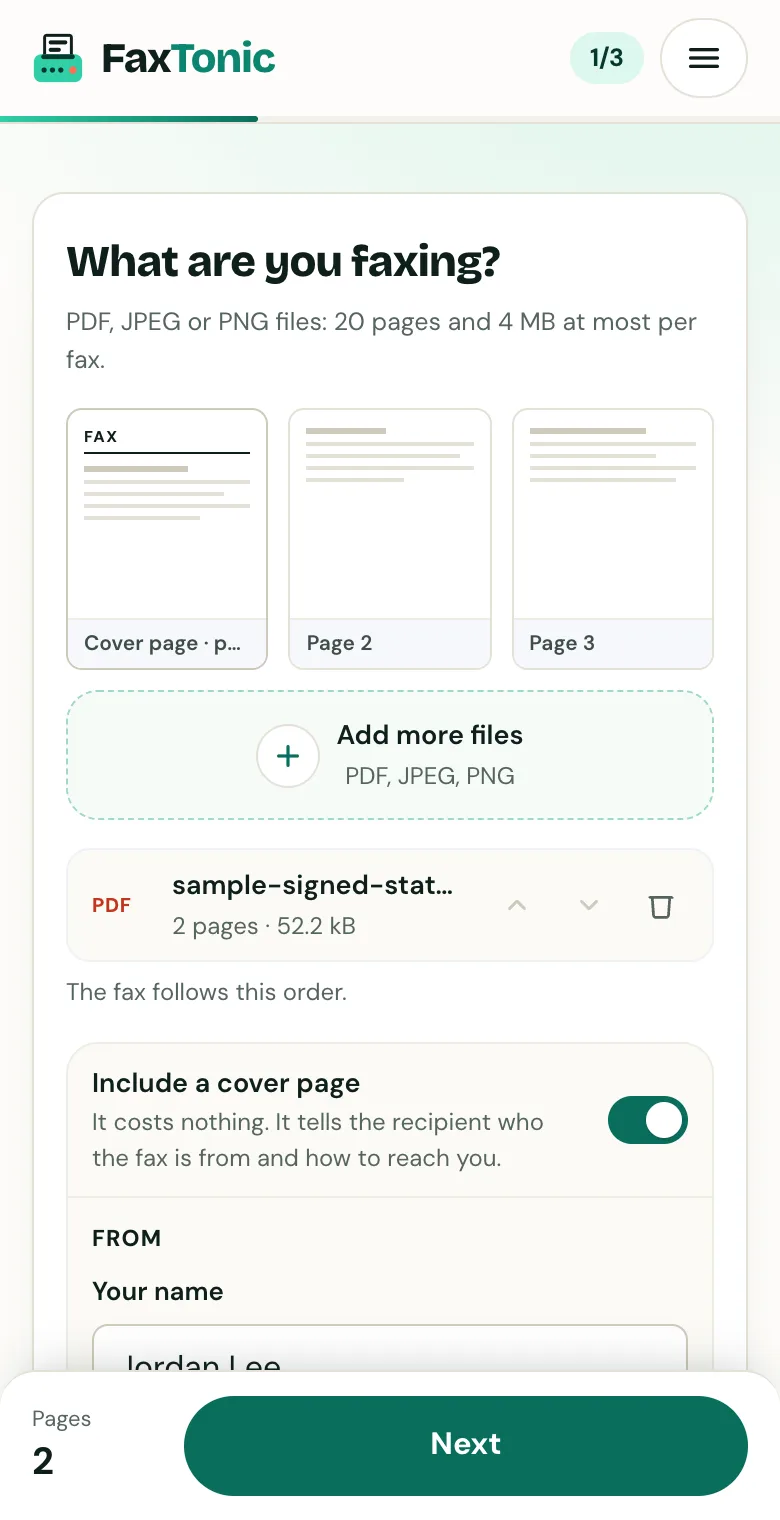
Add your file. The cover page is free, and you can turn it off.
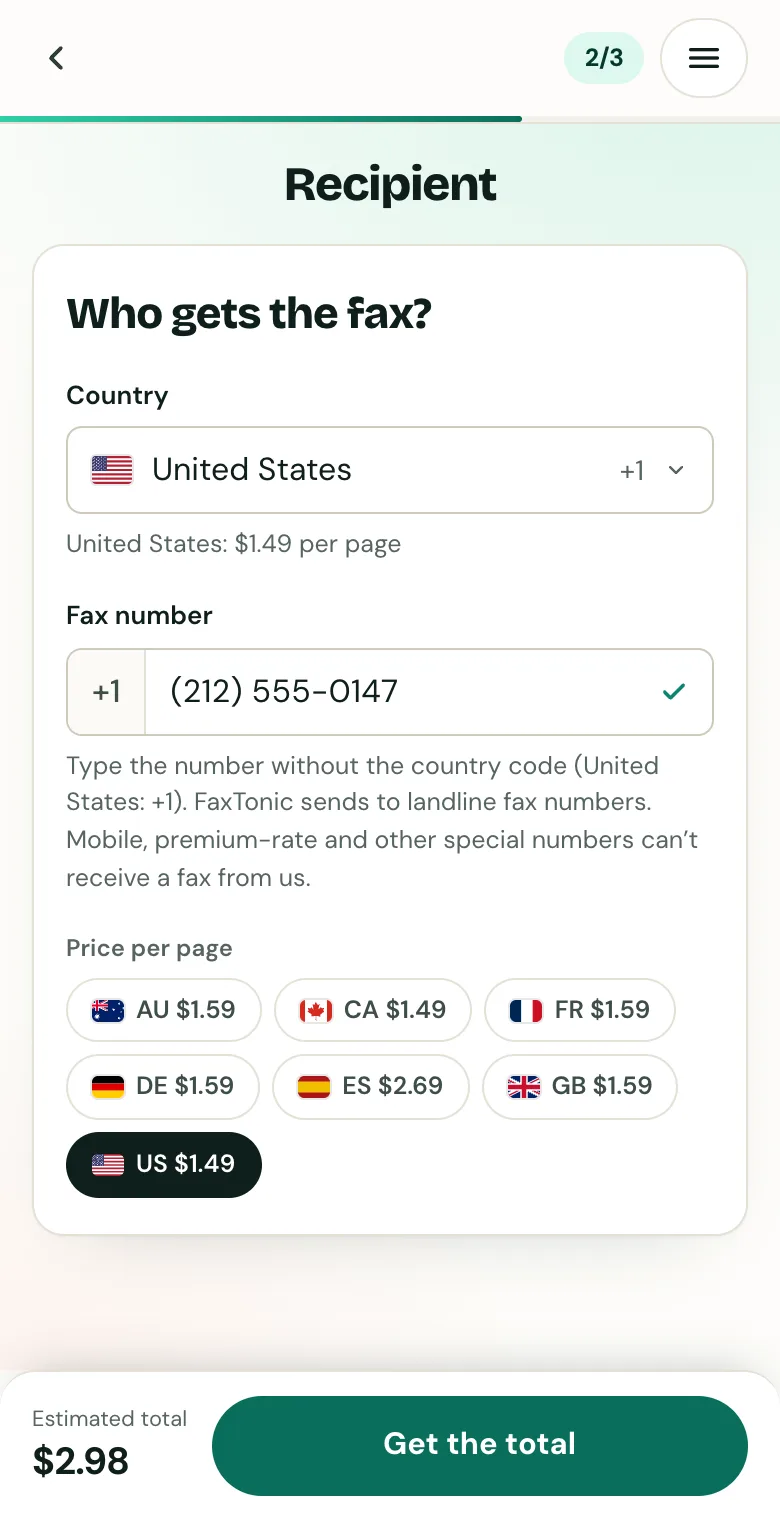
Pick the country and type the fax number.
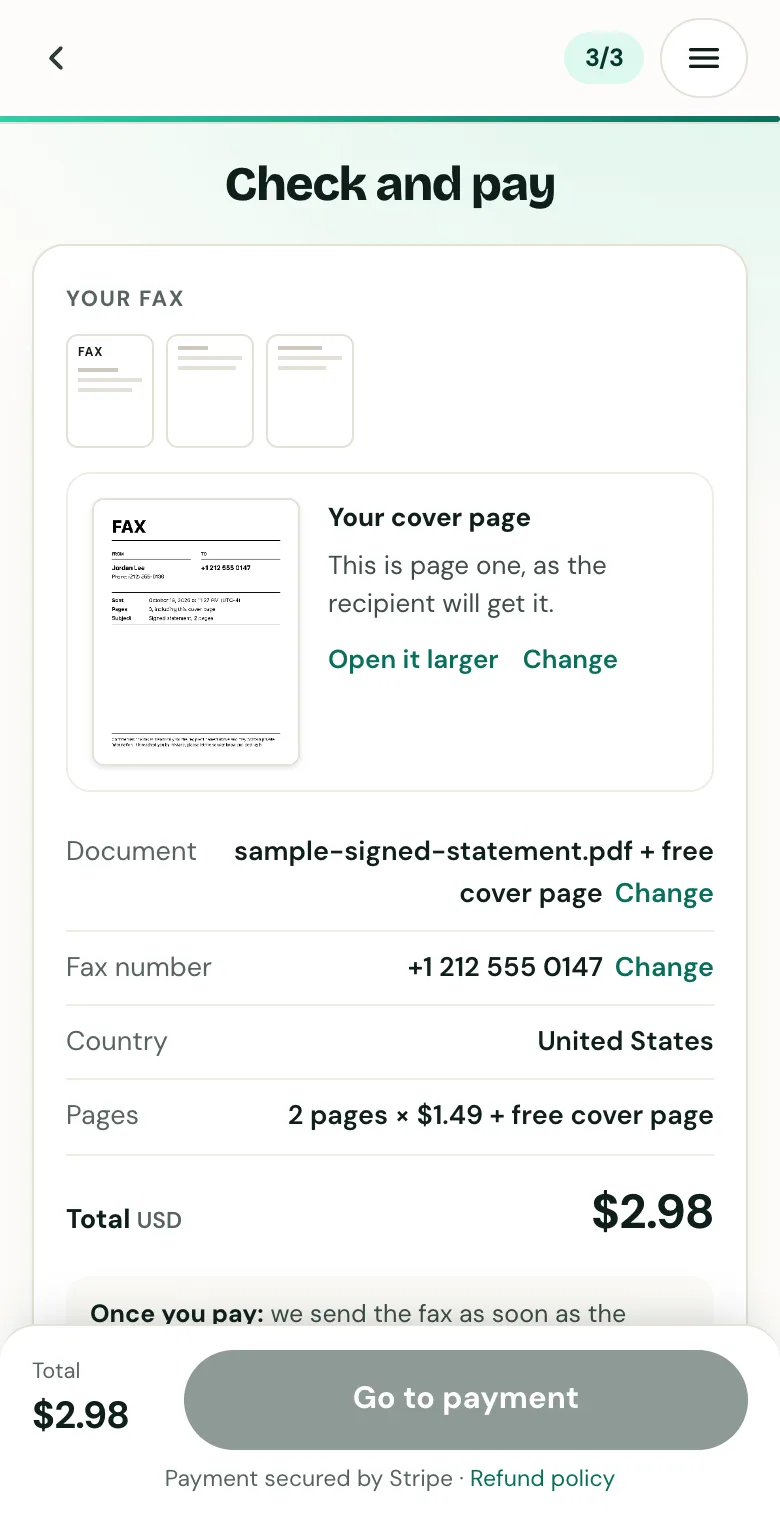
Check the cover page, the number and the total before you pay.
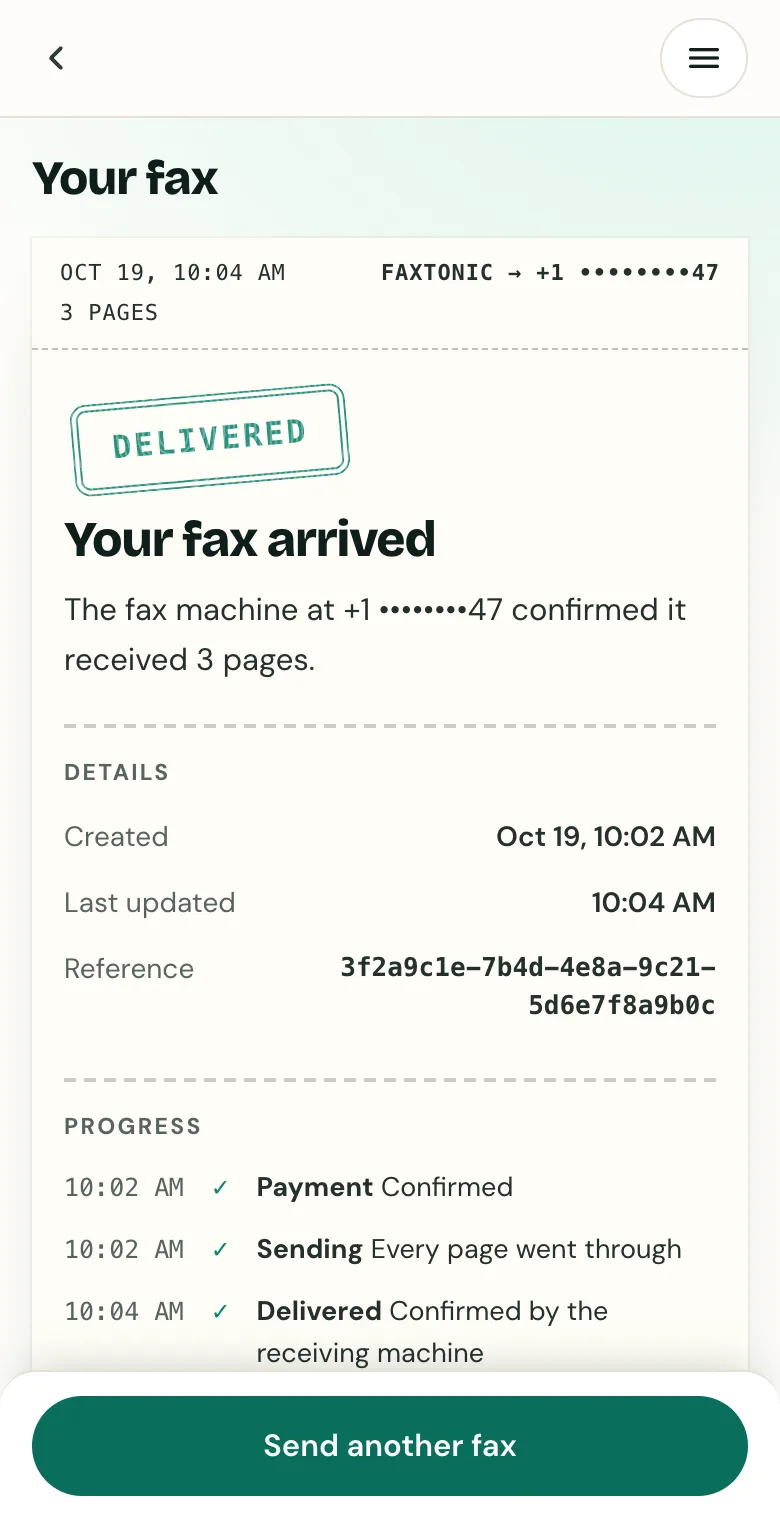
Track your fax: the status page shows when it’s delivered.
Official sources
- IRS: Understanding your CP2000 series notice (fax numbers by location)
- IRS: Instructions for Form 2848 (where to file, fax numbers by state)
- get.gov (CISA): Eligibility for .gov domains
- Social Security blog: How to contact Social Security (fax numbers in the office locator)
- FTC: How to avoid a government impersonation scam
- Brother: problems sending faxes (check that the number answers with fax tones)
- NANPA: About the North American Numbering Plan (10-digit numbers, the 20 countries that share it)
- FCC: Multi-line telephone systems and Kari’s Law (dialing prefixes such as 9)
- FCC: What is a toll-free number and how does it work?
FaxTonic is an independent fax service. It isn’t affiliated with or endorsed by any agency, insurer, court or company named in this guide. Fax numbers and rules change: when a letter or form gives you a fax number, use that one.