On this page
Where to fax Form 2848
The number depends on where the taxpayer lives, not on where the representative works. As a rule of thumb, the IRS records authorizations for states west of the Mississippi in Ogden and for states east of it in Memphis. Arkansas and Louisiana are exceptions that go to Memphis, and Wisconsin goes to Ogden.
| Fax number | If the taxpayer lives in |
|---|---|
| 855-214-7519 (Memphis) | Alabama, Arkansas, Connecticut, Delaware, the District of Columbia, Florida, Georgia, Illinois, Indiana, Kentucky, Louisiana, Maine, Maryland, Massachusetts, Michigan, Mississippi, New Hampshire, New Jersey, New York, North Carolina, Ohio, Pennsylvania, Rhode Island, South Carolina, Tennessee, Vermont, Virginia or West Virginia |
| 855-214-7522 (Ogden) | Alaska, Arizona, California, Colorado, Hawaii, Idaho, Iowa, Kansas, Minnesota, Missouri, Montana, Nebraska, Nevada, New Mexico, North Dakota, Oklahoma, Oregon, South Dakota, Texas, Utah, Washington, Wisconsin or Wyoming |
| 855-772-3156 (Philadelphia) | A US territory, an APO or FPO address, or another country. The IRS also lists 304-707-9785 for faxes sent from outside the United States. |
One exception: if you tick line 4, which marks a power of attorney for a specific use that the IRS doesn’t record on its Centralized Authorization File (CAF), these numbers are the wrong place. Fax or mail that form to the IRS office handling the matter. The IRS asks people not to tick line 4 unless the form really is for a specific use, such as an EIN application.
Sign it by hand, in ink
On a Form 2848 sent by fax or mail, the IRS accepts only signatures written by hand on paper. A typed name, a signature drawn on a screen or a pad, a signature image pasted into the PDF or one made with e-signature software is valid only on a form uploaded through the IRS’s online tool.
So print the form, sign the paper, then scan or photograph the signed pages to fax them. A fax of a page you signed in ink is fine; a PDF with your signature pasted in is not.
- You sign and date line 7. Spouses who filed a joint return each sign a separate Form 2848, even for the same representative.
- Each representative signs and dates Part II, in the order they’re listed on line 2. If you sign first, the representative has 45 days from your date to sign, or 60 days when you live abroad.
- For a business, an officer who can legally bind the corporation signs and writes their exact title. For a partnership, all partners sign, or only the partner authorized to act for it, with a copy of that authorization attached.
What gets a Form 2848 sent back
The IRS publishes the reasons it rejects powers of attorney. Check these before you fax:
- A missing signature or date, from you or from any representative.
- A vague line 3. Each matter needs a description, a form number and the years or periods, for example “Income, 1040, 2023 through 2025”. Entries such as “all years” or “all taxes” get the form returned. Future years count only up to three years after December 31 of the year the IRS receives the form.
- Line 6 ticked with nothing attached. A new Form 2848 generally replaces any earlier one on file for the same matters. To keep an earlier power of attorney in force, tick line 6 and attach a copy of it.
- Gaps in Part II: each representative’s designation (a letter from a to r), the state or jurisdiction that licensed them and, where it applies, their bar, license or enrollment number.
- No title beside the signature of someone signing for a business.
- A missing page. The form has two pages: fax both.
After you fax it
The IRS handles Forms 2848 in the order they arrive, whether faxed, mailed or uploaded. On 19 October 2026 its processing-status page showed them being processed three business days after receipt.
It doesn’t tell you when the form has been recorded. If something is missing, it writes with Letter 861C to say what it needs. A representative who wrote “None” as their CAF number gets a new number by mail.
Send it once. The IRS asks you not to send a duplicate, and not to upload a form online that you’ve already faxed or mailed. If the representative has to act before the form is processed, the IRS suggests faxing the ink-signed form to the IRS employee handling the case.
FaxTonic only sends faxes, and that’s enough for Form 2848: the IRS doesn’t fax anything back for it. Its letters arrive by mail.
The online alternatives
- Submit Forms 2848 and 8821 online, on irs.gov, needs an IRS Secure Access account. It accepts electronic signatures and emails you a receipt, but the form joins the same queue as faxed ones.
- Tax Pro Account is for attorneys, CPAs, enrolled agents, enrolled actuaries and enrolled retirement plan agents. It records most authorizations for individual taxpayers in real time, without a form, when the taxpayer has an address in a US state or DC and an IRS online account. Authorizations for businesses still need Form 2848.
How to fax Form 2848 with FaxTonic
- Download the current Form 2848 from irs.gov, fill it in, print it and sign it in ink. The representative signs Part II the same way.
- Scan or photograph both pages, plus anything you attach, such as a copy of a power of attorney you’re keeping. FaxTonic takes PDF, JPEG, and PNG files, up to 4 MB once prepared for faxing and 20 pages per fax.
- Open FaxTonic and add your file. The IRS doesn’t ask for a cover sheet with this form. FaxTonic’s cover page is free and you can switch it off; if you keep it, put “Form 2848” in the subject.
- Choose the United States and enter the fax number for the taxpayer’s state from the table above. The price shows before you pay: $1.49 a page.
- Pay by card. When the status page shows the fax delivered, save a screenshot of it: it shows the number, the pages and the time.
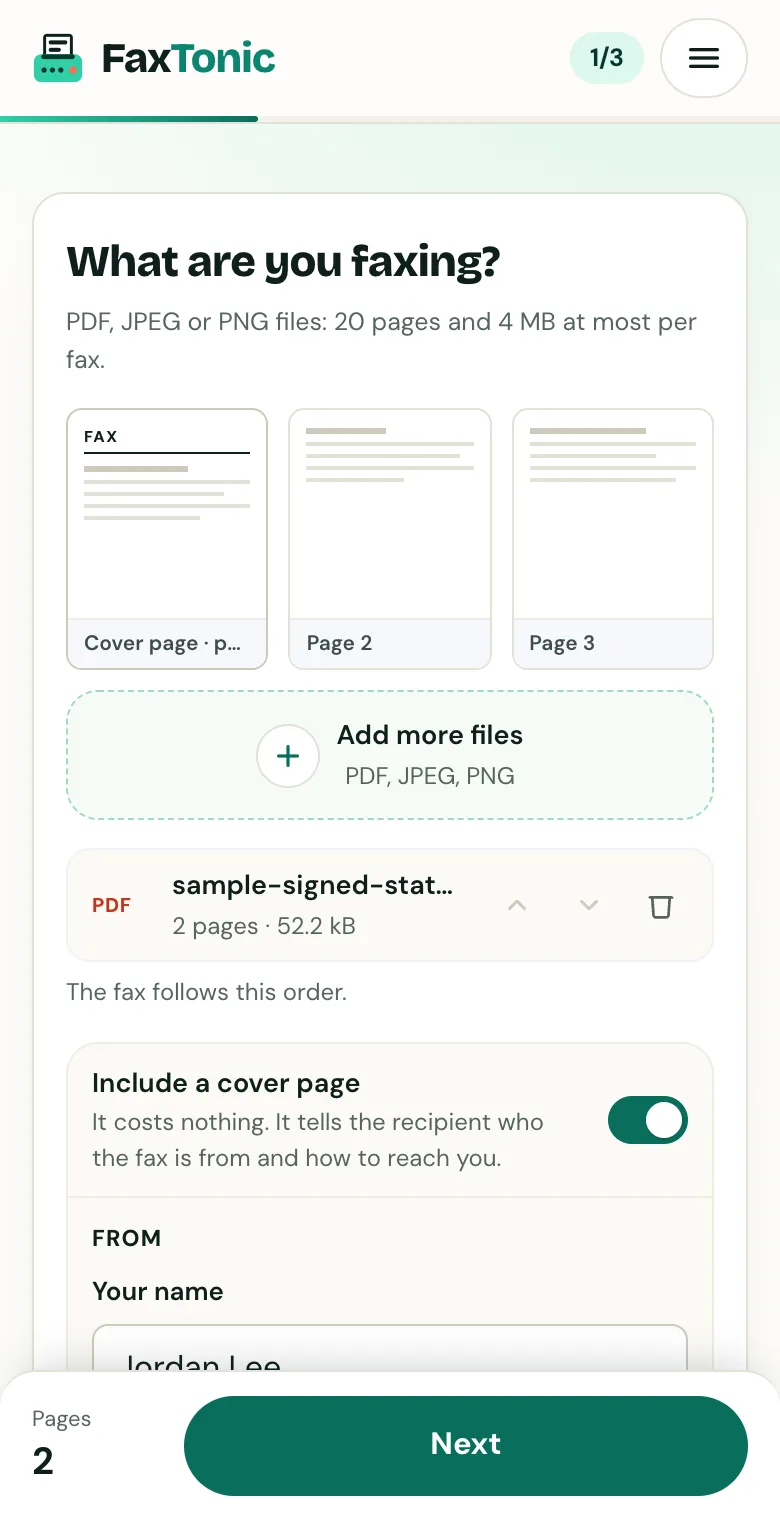
Add your file. The cover page is free, and you can turn it off.

Pick the country and type the fax number.
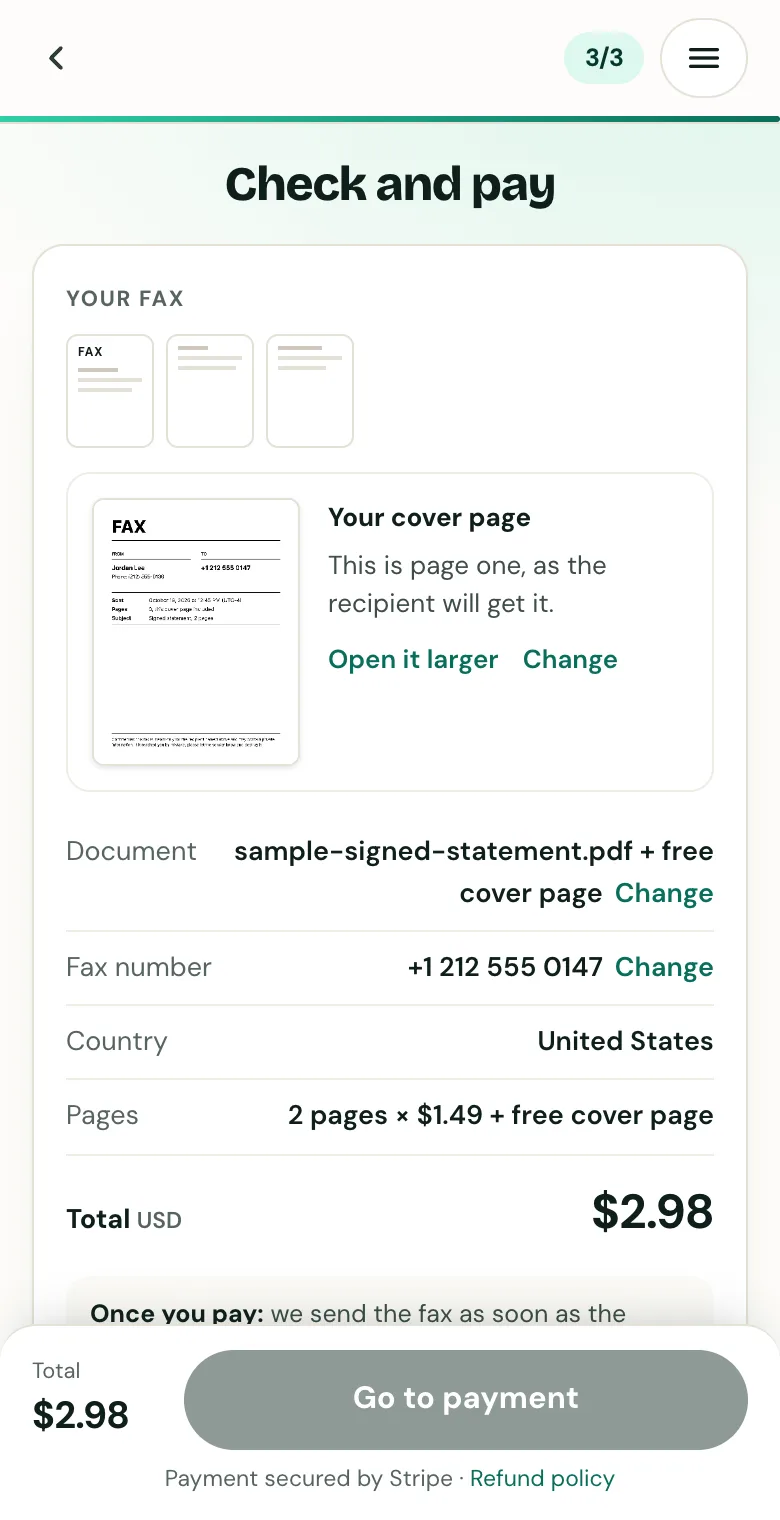
Check the cover page, the number and the total before you pay.
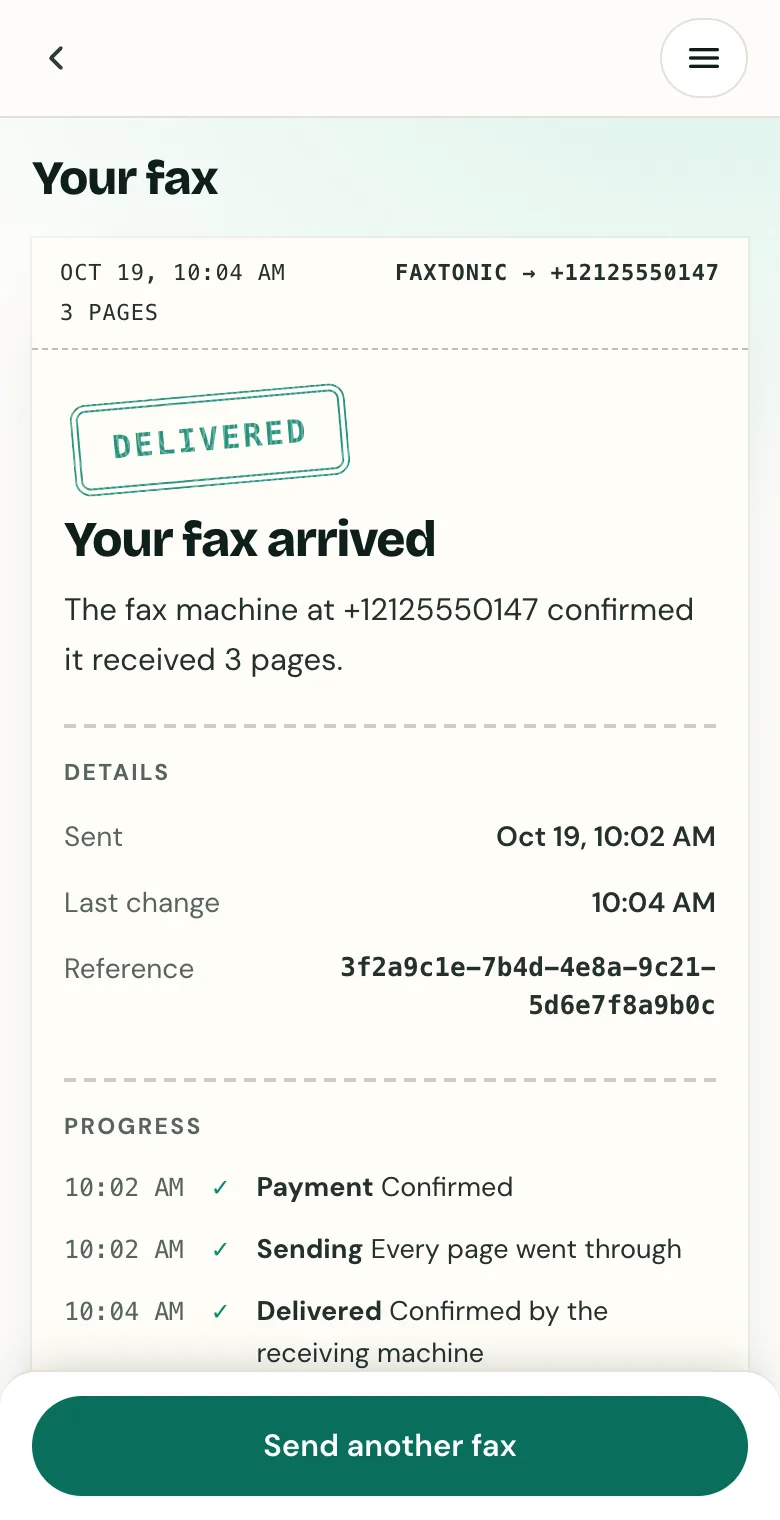
Follow your fax: the status page shows when it’s delivered.
Official sources
- IRS: Instructions for Form 2848
- IRS: Form 2848 (PDF)
- IRS: Items to consider while completing Form 2848
- IRS: Common reasons for power of attorney rejection
- IRS: The CAF, authorization rules
- IRS: Submit Forms 2848 and 8821 online
- IRS: Tax Pro Account
- IRS: Processing status for tax forms
- Internal Revenue Manual 21.3.7, third-party authorizations
FaxTonic is an independent fax service. It isn’t affiliated with or endorsed by any agency, insurer, court or company named in this guide. Fax numbers and rules change: when a letter or form gives you a fax number, use that one.