



On this page
What “went through” means
A fax travels during a phone call, from the sending machine to a fax machine or fax service at the other end, and that end confirms the pages it took in. That confirmation is what a sending machine reports as a successful fax, and what FaxTonic shows as Delivered.
It tells you that a fax machine at the dialed number took the pages, and nothing more:
- The number may be wrong. If a fax machine answers at a mistyped number, that machine confirms the fax.
- Nobody may have seen it yet. Canon’s manual for its MAXIFY MB2000 series explains that with no paper loaded, or not enough ink, the printer stores received faxes in its memory without printing them. Some machines also send incoming faxes elsewhere: Brother’s memory receive options include Fax Forwarding, PC-Fax Receive, and forwarding to online services or a network destination.
On a fax machine: the transmission report
Fax machines and all-in-one printers can print a report about a fax they’ve sent. What it’s called, what it shows and when it prints depend on the brand and model:
- Brother calls it the Transmission Verification Report. It lists the receiving party’s name or fax number, the date and time, how long the transmission took, the number of pages sent, and the result: OK next to RESULT if the fax went through, NG if it didn’t. On the MFC-L2750DW and related models, the factory setting prints it only after an error. To get one after every fax on the MFC-L2750DW, go to Settings > All Settings > Fax > Report Setting > Transmission and choose On.
- Canon prints a TX REPORT. By default, the MAXIFY MB2000 series prints only an ERROR TX REPORT, when a send fails, with an error number such as #018 (the line was busy) or #005 (the recipient’s machine didn’t respond). You can set the machine to print a TX REPORT after every fax instead.
- HP PageWide Pro MFP 772 and 777 printers have two settings under Setup > Reports > Fax Reports: Fax Confirmation prints a report after a successful fax, and Fax Error Report prints one after a failed fax.
These machines also keep a log of recent faxes, sent and received. On some Brother models, the Fax Journal lists the last 200, with TX for sent and RX for received; Canon’s ACTIVITY REPORT lists recent faxes, and HP’s Last 30 Transaction Fax Logs prints the last 30 entries. The recipient can look for your fax in the same kind of log on their own machine.
FaxTonic doesn’t print or provide a report like this: there’s no transmission report, confirmation sheet or confirmation PDF. If someone asks for the confirmation of a fax you sent with FaxTonic, explain that you sent it online, and ask whether a screenshot of the status page will do, with the full fax number and the year noted next to it.
On FaxTonic: what the status page shows
Once you’ve paid, the fax’s status page follows it and refreshes on its own. While FaxTonic is dialing, it shows Sending, and a short fax usually takes a minute or two. When the receiving machine confirms the fax, the page switches to Delivered. Its title reads “Your fax arrived”, the line under it gives the number of pages the fax machine confirmed, and the Delivered step of the progress list reads “Confirmed by the receiving machine”.
- The time next to Delivered is when FaxTonic recorded that confirmation. It’s shown in your device’s time zone, without the zone’s name.
- Dates have no year. Write the year down yourself, next to your screenshot.
- The number is masked to the country code and the last two digits, like “+1 ••••••••23”. About 30 days after the fax ends, even that disappears, so keep the full number somewhere else.
- Also on the page: the number of pages, the amount you paid, when the fax was created, and a reference.
Take a screenshot as soon as the page shows Delivered, and keep the page’s link: with no FaxTonic account, the link is the only way back to it. Anyone who has the link can open the page, so share it only with people who need it. The status page is your record of sending. It shows that a fax machine confirmed the pages, not who read them.
Keep your own copy of what you sent, too. FaxTonic deletes your document once the fax is delivered or has failed.
The payment receipt
Just before you pay, FaxTonic offers a field called “Email for your receipt”. If you fill it in, Stripe, our payment provider, can send a receipt to that address, which FaxTonic doesn’t keep.
The receipt shows that you paid, not that the fax arrived. Keep it with your screenshot of the status page.
Ask the recipient
A fax machine’s confirmation speaks for the machine, not for the person. To know your fax reached the right desk, ask:
- Before you send, put your name and phone number on the free cover page, so the recipient can call you if a page is missing or hard to read.
- Once it’s delivered, call or email the recipient with the date, the time shown on the status page and the number of pages. The header line at the top of each page can show FaxTonic’s sending number rather than yours, so tell them the fax came from an online fax service.
- If you need it in writing, ask them to confirm by email that they received it.
If the recipient says nothing arrived but the status page shows Delivered, see what to do when the recipient can’t find a delivered fax.
If the status page says Not delivered
Not delivered · refund under way means the fax didn’t go through, and Refunded means the refund has been sent to your card; depending on your bank, it can take a few business days to show up. The page doesn’t say why a fax failed.
The refund is automatic: the price minus a fee of $0.30 + 2.9%, or the whole price if our fax provider refuses the fax when we submit it. FaxTonic doesn’t resend a failed fax, so to try again, you send a new one. Before you do, read why a fax doesn’t go through and what to check. The refund policy has the details.
If there’s a deadline, don’t wait until the last hour: a busy line can make a fax fail, and you’ll want time to send a new one.
How to follow your fax with FaxTonic
- Open FaxTonic and add your document. On the free cover page, add your name and phone number.
- Choose the country and type the fax number. Write the full number down somewhere you’ll keep it.
- For a receipt, enter your email address under “Email for your receipt”. Then pay by card: $1.49 a page to the United States.
- Keep the status page open. It refreshes on its own until the fax shows Delivered or Not delivered.
- Take a screenshot, note the year, and save the page’s link.
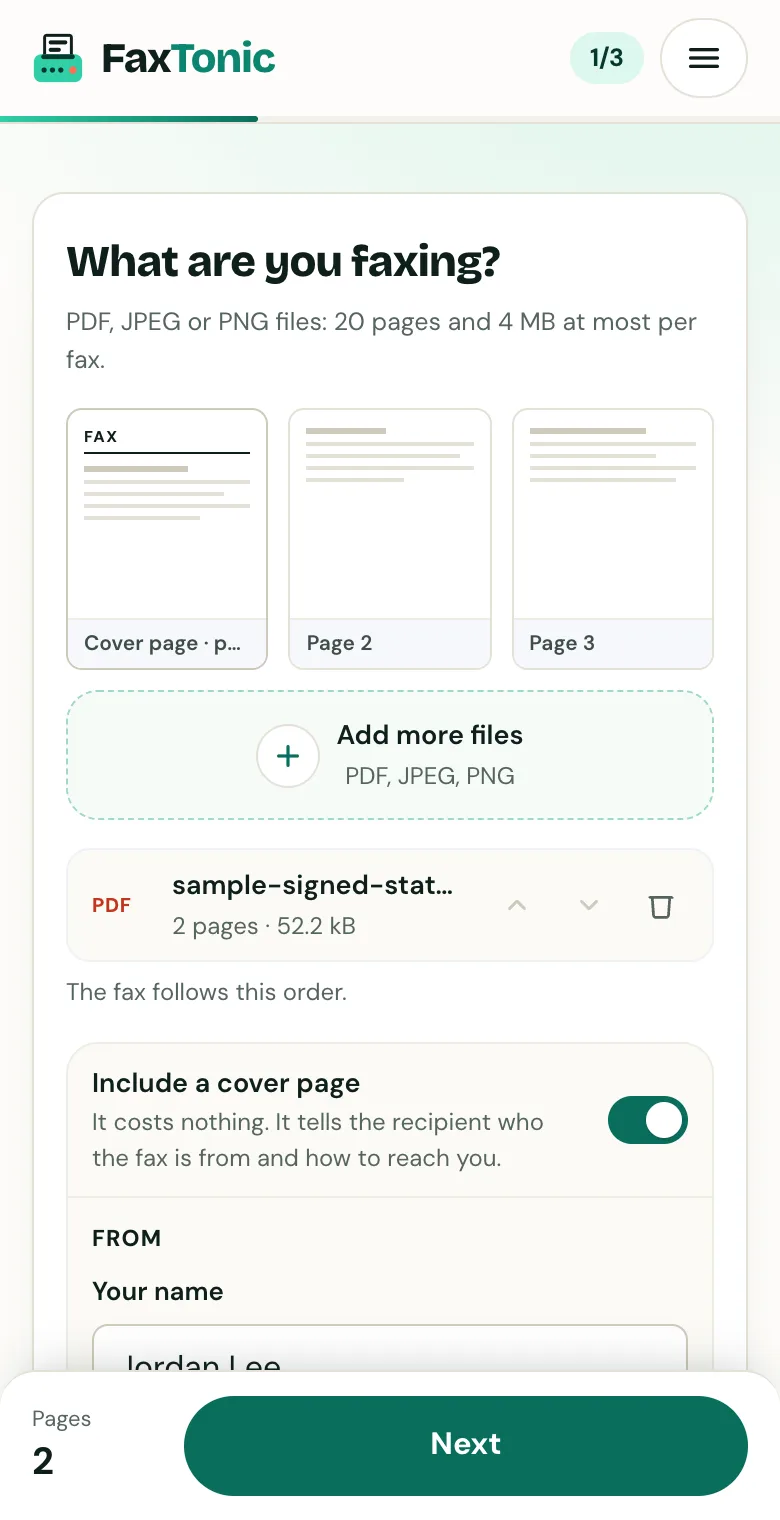
Add your file. The cover page is free, and you can turn it off.
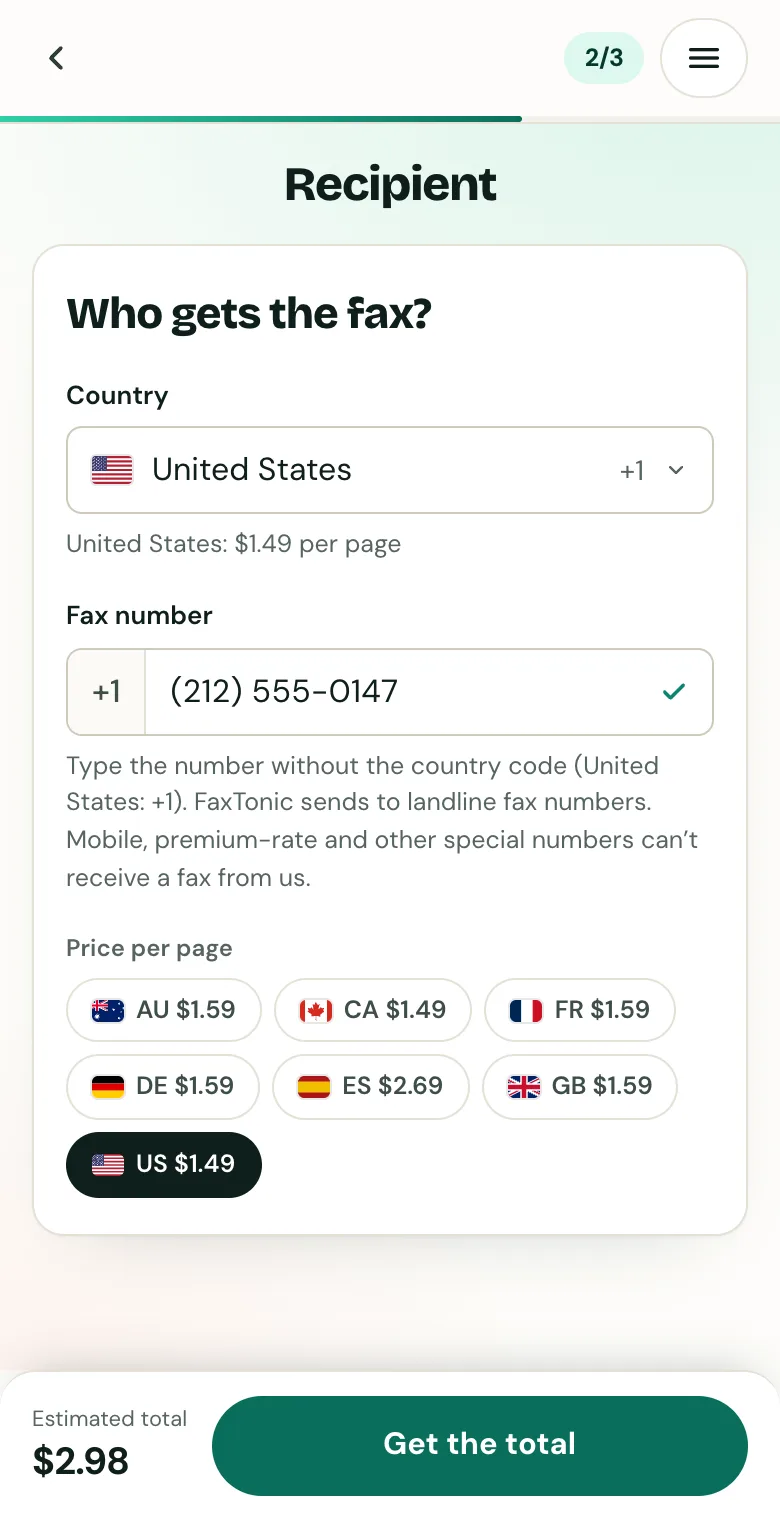
Pick the country and type the fax number.
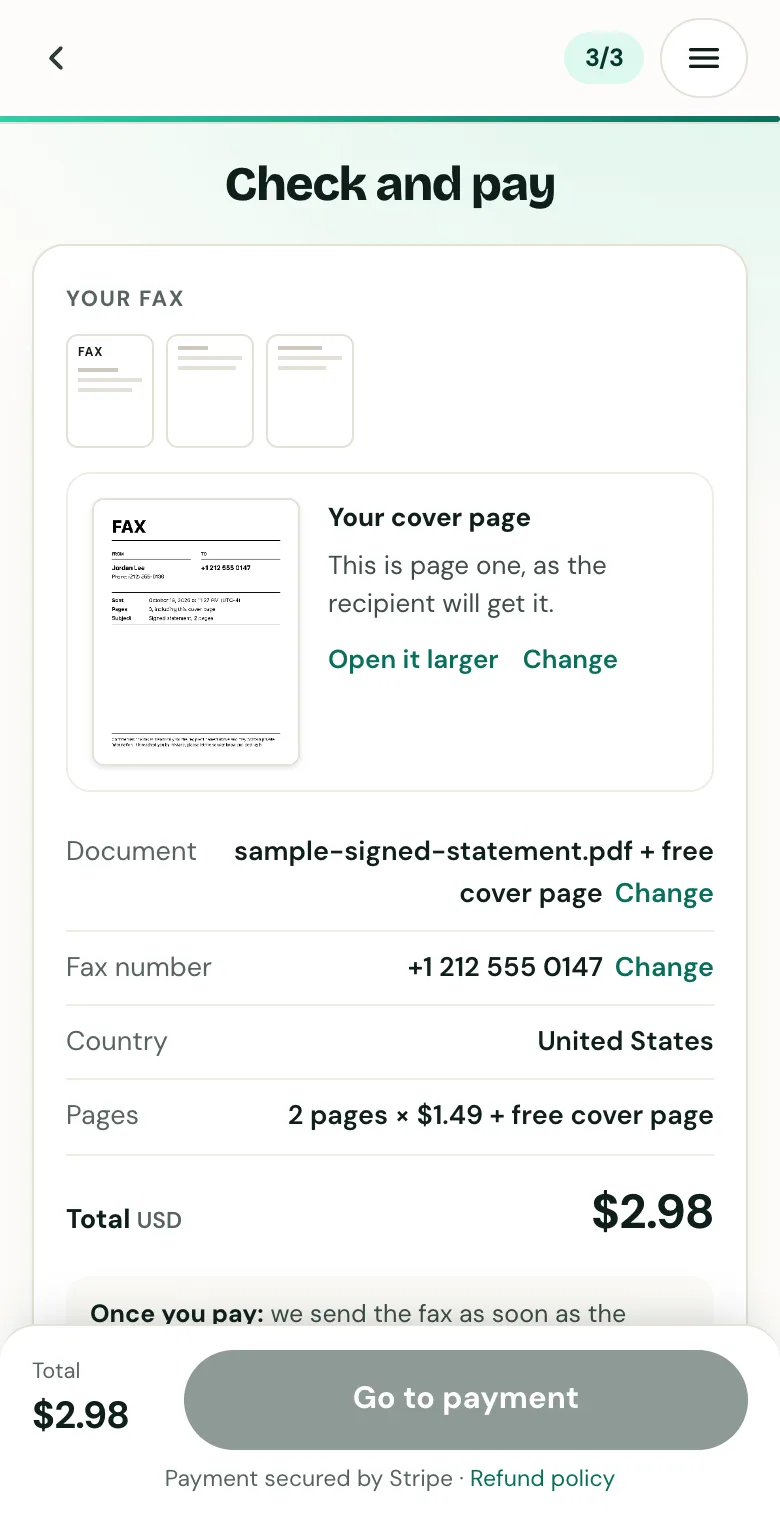
Check the cover page, the number and the total before you pay.
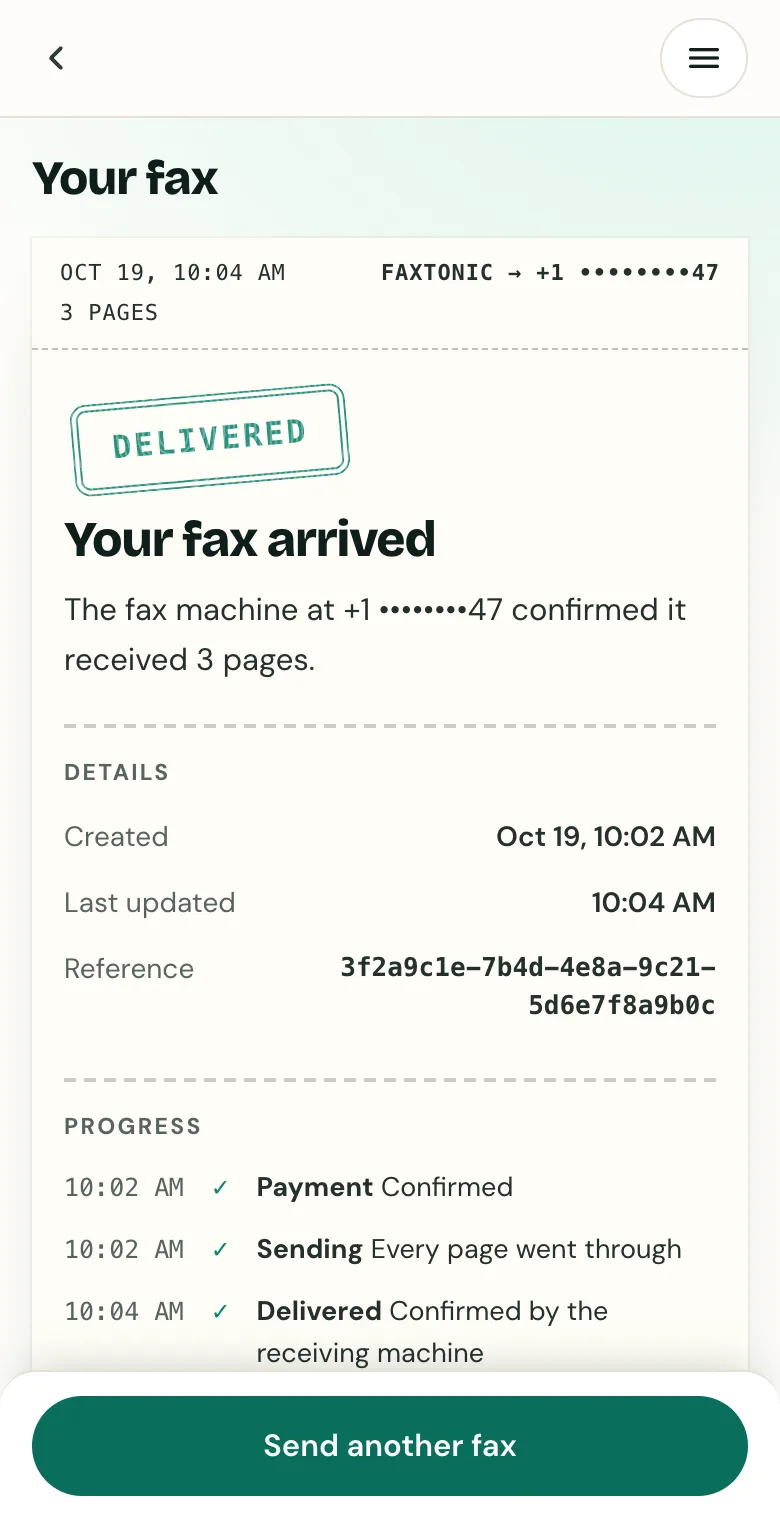
Track your fax: the status page shows when it’s delivered.
Official sources
- Brother: Print a Transmission Verification Report (MFC-L2750DW series: OK or NG, factory setting)
- Brother: Set the Transmission Verification Report’s style (what the report lists)
- Brother: Reports overview (Fax Journal)
- Brother: Memory receive options (forwarding received faxes)
- Canon: Summary of reports and lists, MAXIFY MB2000 series (TX REPORT, error numbers)
- Canon: Problems receiving faxes, MAXIFY MB2000 series (faxes kept in memory without paper or ink)
- HP: PageWide Pro 750, MFP 772, 777 information pages (fax reports)
FaxTonic is an independent fax service. It isn’t affiliated with or endorsed by any agency, insurer, court or company named in this guide. Fax numbers and rules change: when a letter or form gives you a fax number, use that one.