



On this page
If people need to fax you
A machine answers on your phone line, and that line’s number is your fax number. HP’s fax printers can then print what comes in, forward it to email, or save it to a folder on your computer, depending on the settings, but the call itself still arrives over the phone line.
If that line is also your home phone, it takes some setting up. HP says a printer can’t receive faxes automatically on a line with voice mail, and suggests a second line without voice mail if you expect a lot of faxes.
Or a fax service answers for you: it gives you a fax number and takes in the faxes sent to it.
If you only ever send faxes, you need none of this. The office you’re faxing has the fax number; you only have to reach it.
FaxTonic only sends faxes: it doesn’t receive them, and it doesn’t give you a fax number. The header line on the received pages may show FaxTonic’s sending number instead of yours, so put your phone number or email address on the free cover page and ask for the answer that way.
How often you fax, and what you fax
- An occasional form, like a signed authorization an office wants by fax: buying a machine and keeping a line it works on is a lot of setup for that. Online, all you need is the file, the number, and a card; see how to send a fax without a fax machine.
- Stacks of paper, often: a machine takes the pages as they are. You load them in the document feeder or on the glass, dial, and it scans and sends them, and depending on the model and its settings it can print a report on each fax (Did my fax go through? explains what it shows). Online, you scan or photograph each document first.
For other ways to send a fax without a machine of your own, such as a library or a store, see where to send a fax.
What a fax machine needs: a phone line
HP, Epson, Canon, and Brother all begin fax setup the same way, with a phone cord from the machine to a phone line:
- HP: “In most cases, faxing requires a traditional landline telephone service.” HP adds that you might be able to fax over VoIP or DSL with the right setup and equipment.
- Epson: the WorkForce Pro WF-4820 has to be plugged into a telephone wall jack before it can send or receive a fax.
- Canon: the manual for its TR4500 series says to connect the printer to the telephone line, and set it up, before you use the fax functions.
- Brother: to fax on internet phone service with the MFC-J4335DW, you still connect a phone cord to the jack labeled LINE, with its other end going to a modem, phone adapter, splitter, or similar device.
Putting the printer on Wi-Fi doesn’t change that: the fax still goes out over the phone cord. The same goes for faxing from your computer through the printer’s software. HP’s Windows and Mac instructions both start by checking that the printer is connected to the telephone line and can already send and receive faxes.
In an office phone system (a PBX), HP says the printer needs a PBX converter or terminal adapter, and HP’s sending steps have you dial the outside line access code as part of the number.
Not every all-in-one printer faxes, so look for fax in the list of functions before you buy, then check the next section for the line you’ll plug it into.
Internet phone, cable, fiber, or cell service
The FCC says the vast majority of American households are wireless-only, or pair wireless service with an internet-based home phone (VoIP). Here’s what fax machine makers say about faxing on those lines:
- Internet phone (VoIP): asked whether you can fax over VoIP, HP answers “Maybe”, depending on your provider and the sound quality. You need an analog telephone adapter (ATA), and HP suggests turning on error correction mode (ECM) and choosing the slowest fax speed. Brother warns that the MFC-J4335DW may not work with some VoIP systems, and if faxes give you trouble, it recommends changing the modem speed to Basic(for VoIP). Canon’s TR4520 has an Err reduction (VoIP) setting that may reduce errors on internet lines such as IP phones.
- Why it can fail: in a help article for its FAX-2840, FAX-2940, and MFC-7240, Brother explains that fax machines are time-sensitive, so when data packets are delayed on an internet line, the transmission may time out.
- Cable phone and fiber: Epson says it can’t guarantee that the WF-4820 works with VoIP, cable phone systems, or fiber-optic digital services.
- DSL: Epson says you must connect a DSL filter at the wall jack to use the line for faxing, and HP says a microfilter can improve the chance of a successful fax.
- Cell service only: HP says cellular networks currently don’t support faxing from a printer.
Copper landlines are being retired, too. The FCC says phone and internet providers will retire aging copper networks in areas where fiber, mobile and fixed wireless, or satellite services are available to replace them, and it suggests asking manufacturers and service providers whether devices such as fax machines will work on the new network. Before you buy a machine, ask your phone company what kind of line you have and whether any changes are planned.
What you pay for
Prices for machines, ink, and phone service vary too much to quote here, so compare what each option has you pay for:
- A machine: the machine itself, ink or toner, paper, and the phone line it needs, which you pay for whether you fax or not. On internet phone service, you may also need an analog telephone adapter; HP says you can buy one from an electronics or office supply retailer.
- FaxTonic: a price per page that depends on the destination, $1.49 to the United States, with the cover page free. There’s no equipment to buy, no account, no subscription, and nothing to pay between faxes. If a fax doesn’t go through, you’re refunded automatically: the price minus a fee of $0.30 + 2.9%, or all of it if our fax provider refuses the fax when we submit it. Every country’s price is on the pricing page.
Side by side
| What matters | Fax machine or all-in-one with fax | FaxTonic |
|---|---|---|
| Needs a phone line | Yes, plugged into the machine with a phone cord | No: a browser and an internet connection |
| VoIP, cable, fiber, or cell service | May not work, depending on the model and the line; HP says cell networks don’t support faxing from a printer | Doesn’t matter: our fax provider dials the number |
| Receiving | Yes, at your line’s number | No, and no fax number |
| Sending | Yes | Yes, to these countries: United States, Canada, United Kingdom, France, Germany, Australia, and Spain |
| Paper documents | Go straight into the feeder or onto the glass | Need a scan or a photo first; your phone can take it |
| Setting up | Phone cord, fax header, answer mode, and rings to answer | Nothing to set up |
| Record of the fax | A transmission report, depending on the model and its settings | The status page; no transmission report |
| What you pay | The machine and its ink or toner and paper, plus the phone line | $1.49 a page to the United States, cover page free, no subscription |
Send a fax without buying a machine, with FaxTonic
- Get the document into a file: scan paper pages with your phone (how to fax a paper document with your phone), or save a digital document as a PDF.
- Open FaxTonic and add the file.
- On the free cover page, fill in Your name, plus Your phone number or Your email address, since a reply can’t come back to you by fax.
- Pick the country, type the fax number, and click Get the total.
- In Check and pay, check the number and the total ($1.49 a page to the United States), then pay by card.
- Keep the status page’s link, and take a screenshot when it shows Delivered.
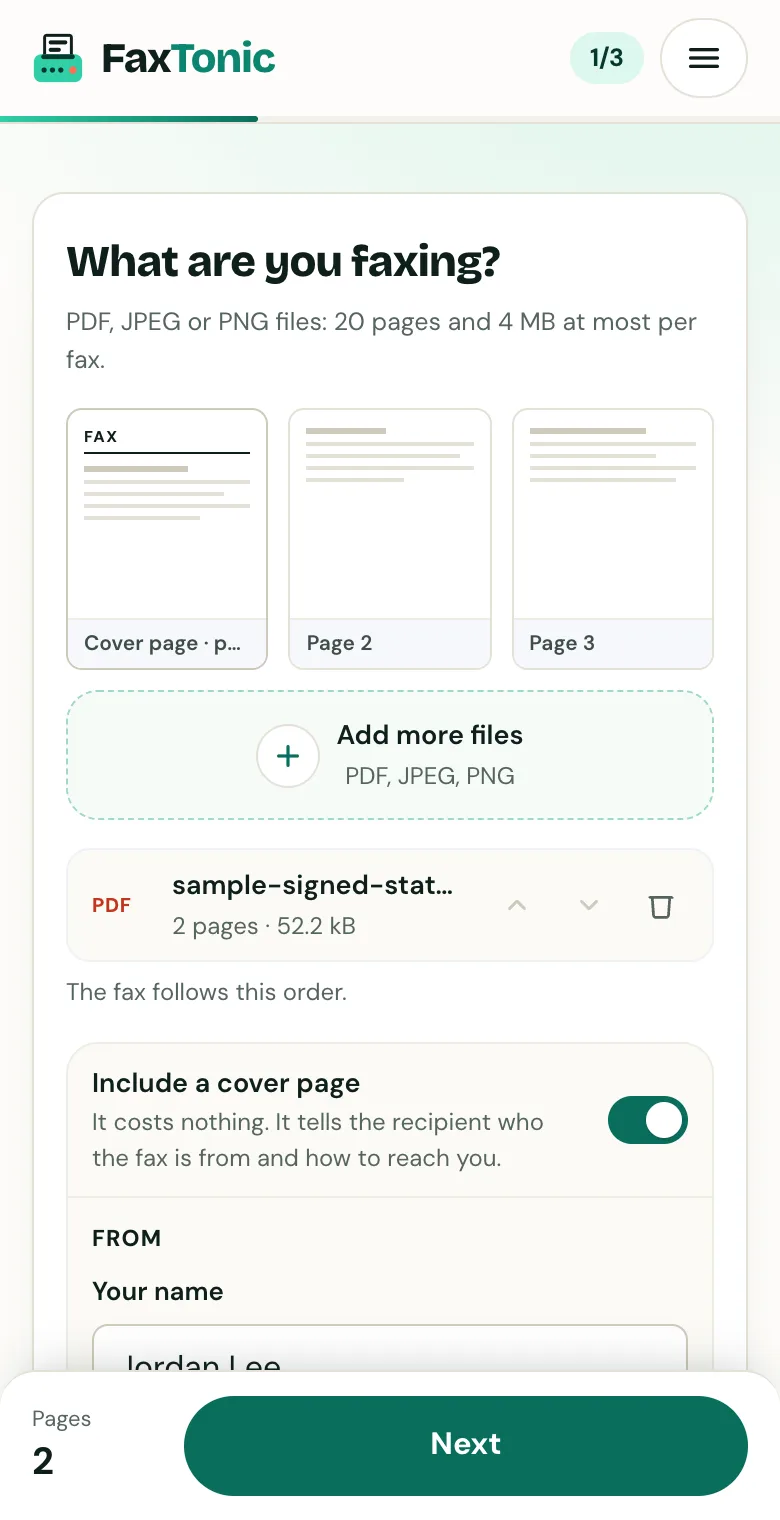
Add your file. The cover page is free, and you can turn it off.
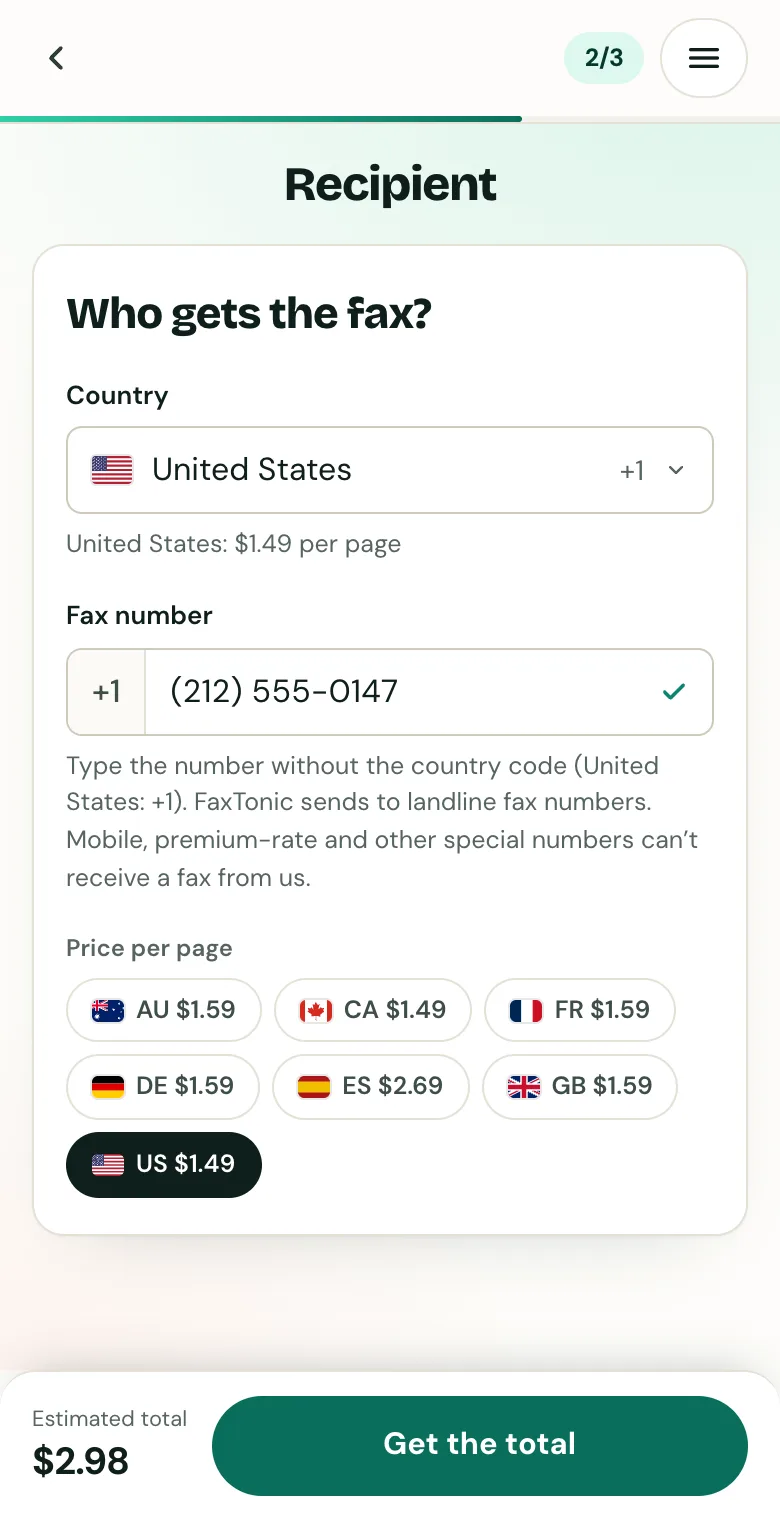
Pick the country and type the fax number.
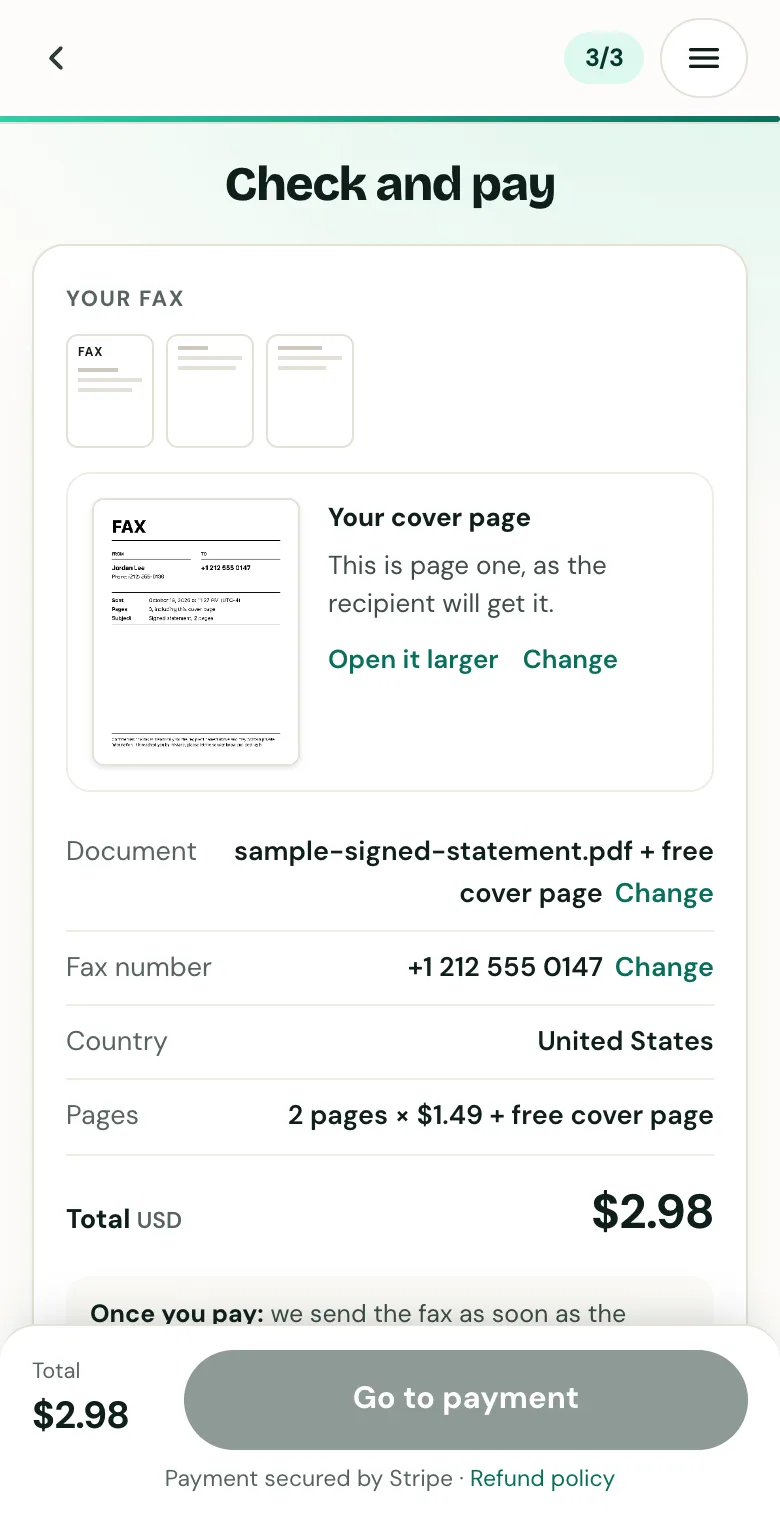
Check the cover page, the number and the total before you pay.
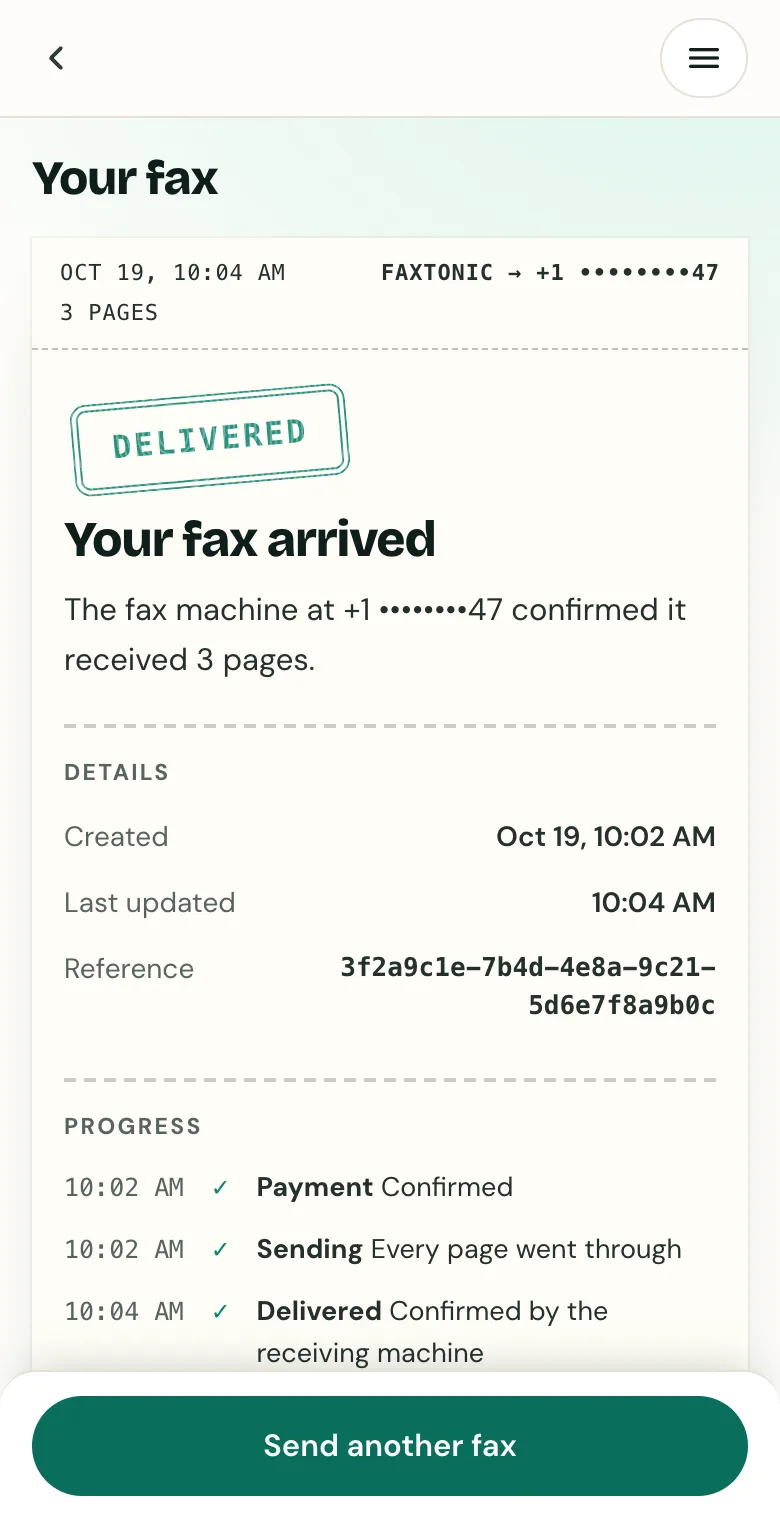
Track your fax: the status page shows when it’s delivered.
Official sources
- HP: How to fax with an HP printer or fax machine (landline, VoIP, DSL, cell service, PBX)
- Epson: Connecting a telephone or answering machine (WorkForce Pro WF-4820: wall jack, VoIP, cable, fiber)
- Canon: Preparing for faxing (TR4500 series)
- Canon USA: FAX settings, TR4520 (Err reduction (VoIP))
- Brother: Voice Over Internet Protocol (VoIP/Telephone Line Interference), MFC-J4335DW
- Brother USA: Problems sending faxes when using VoIP (FAX-2840, FAX-2940, MFC-7240)
- FCC: Tech transition, modernizing communications services (copper retirement, fax machines)
FaxTonic is an independent fax service. It isn’t affiliated with or endorsed by any agency, insurer, court or company named in this guide. Fax numbers and rules change: when a letter or form gives you a fax number, use that one.