On this page
The VA’s fax numbers
| Fax number | What it’s for |
|---|---|
| 844-531-7818 (from the United States), 248-524-4260 (from abroad) | Disability compensation: the Claims Intake Center in Janesville, Wisconsin. The VA says correspondence about compensation claims can be mailed or faxed there. |
| 844-678-8979 | The Board of Veterans’ Appeals: a Board Appeal (VA Form 10182) and its supporting documents |
| 844-655-1604 | The Pension Intake Center, as printed on VA Forms 20-0995 and 21-4193. The VA’s pension, survivors and burial pages list no fax. |
Both disability numbers are US numbers, so you can fax them with FaxTonic from anywhere. If a VA letter gives you a different number, use that one.
Form by form
| Form | What it’s for | How the VA says to send it |
|---|---|---|
| 21-526EZ | Disability compensation claim | Online, by fax to 844-531-7818 (or 248-524-4260 from abroad), by mail, in person or through a representative. The PDF itself lists only mail and online. |
| 20-0995 | Supplemental Claim | Online for disability compensation only; otherwise mail, in person or through a VSO. The PDF also prints 844-531-7818 for compensation and 844-655-1604 for pension and survivors. |
| 10182 | Board Appeal | Online, by mail, or by fax to 844-678-8979 with any supporting documents |
| 20-0996 | Higher-Level Review | No fax: online for disability compensation, by mail or in person |
| 21-0966 | Intent to file | No fax listed: online, by phone at 800-827-1000, by mail or in person |
| 21-4138, 21-4142, 21-4142a, 21-10210, 21-0781 | Statements and records authorizations that support a claim | Their instructions list mail and online only |
| 21-686c, 21-674 | Adding or removing dependents, school attendance | Online or by mail |
| 21-22, 21-22a | Appointing a VSO, an attorney or a claims agent | QuickSubmit, mail or in person, signed by you and the representative |
| 21P-527EZ, 21P-534EZ, 21P-530EZ | Veterans pension, survivors benefits, burial allowance | Online, QuickSubmit upload or mail to the Pension Intake Center; no fax on these pages |
| 10-10EZ, 10-10EZR | Health care enrollment and updates | No fax: online, by phone, by mail or in person |
| 22-1990 | GI Bill education benefits | No fax: online, or by mail to a regional processing office |
The supporting forms in the middle of the table are a grey area. Their own instructions mention only mail and online, but the VA’s compensation contact page says correspondence about a compensation claim can be faxed to 844-531-7818. When in doubt, use a route the form itself gives.
To cancel a representative, the VA says you can fax a letter to 844-531-7818, or 248-524-4260 from abroad.
Signatures and dates
The VA’s claims manual says faxed or photocopied versions of original ink signatures are acceptable, and that the VA accepts electronic signatures on claims, decision reviews and related forms unless there are clear signs of fraud. It also counts the date a fax was received as the date the VA received the document.
Health care forms have their own rule: the 10-10EZ says an unsigned or undated form is returned, and a signature made with an X needs two witnesses.
After you fax
- No online tracking for faxes. The VA’s claim status tool doesn’t show documents sent by mail or fax.
- Replies come by mail, or by email and text for Board Appeal updates if you’ve signed up. Decision letters are mailed and, the VA says, should arrive within 10 business days.
- Send each document once. For uploads, the VA’s manual says not to mail the original as well, because it creates duplicates in the claim file.
On 19 October 2026, va.gov gave an average of 68.2 days to decide a disability claim in September 2026, and an average of 58.3 days for a Supplemental Claim.
FaxTonic can’t receive faxes, and the VA doesn’t answer by fax. Give the VA your phone number and postal address.
Uploading instead
For evidence on a pending disability claim, the VA points to its claim status tool on va.gov, which takes PDF, GIF, JPEG, BMP and TXT files up to 25 MB, but not claim forms. For any other document, and for evidence for a decision review or an appeal, it points to QuickSubmit, which veterans, family members and representatives can use after registering.
Avoid claims predators
The VA warns about people who charge veterans unlawfully to “help” with a claim, and urges using only VA-accredited attorneys, claims agents and Veterans Service Organization representatives. Help from an accredited VSO is always free. Report predatory practices at VSAFE.gov or 833-38V-SAFE.
How to fax the VA with FaxTonic
- Check the table above for the form you’re sending, fill it in and sign it.
- Scan the pages, or photograph each one flat and in good light. FaxTonic takes PDF, JPEG, and PNG files, up to 4 MB once prepared for faxing and 20 pages per fax, cover page included. A long application with its evidence may need more than one fax.
- Open FaxTonic and add your file. Keep the free cover page with your name, the veteran’s name, a phone number and the form number in the subject.
- Choose the United States, enter the number and check the price: $1.49 a page. Then pay by card.
- Save a screenshot of the status page once the fax is delivered: since the claim status tool won’t list faxed documents, it’s your record.
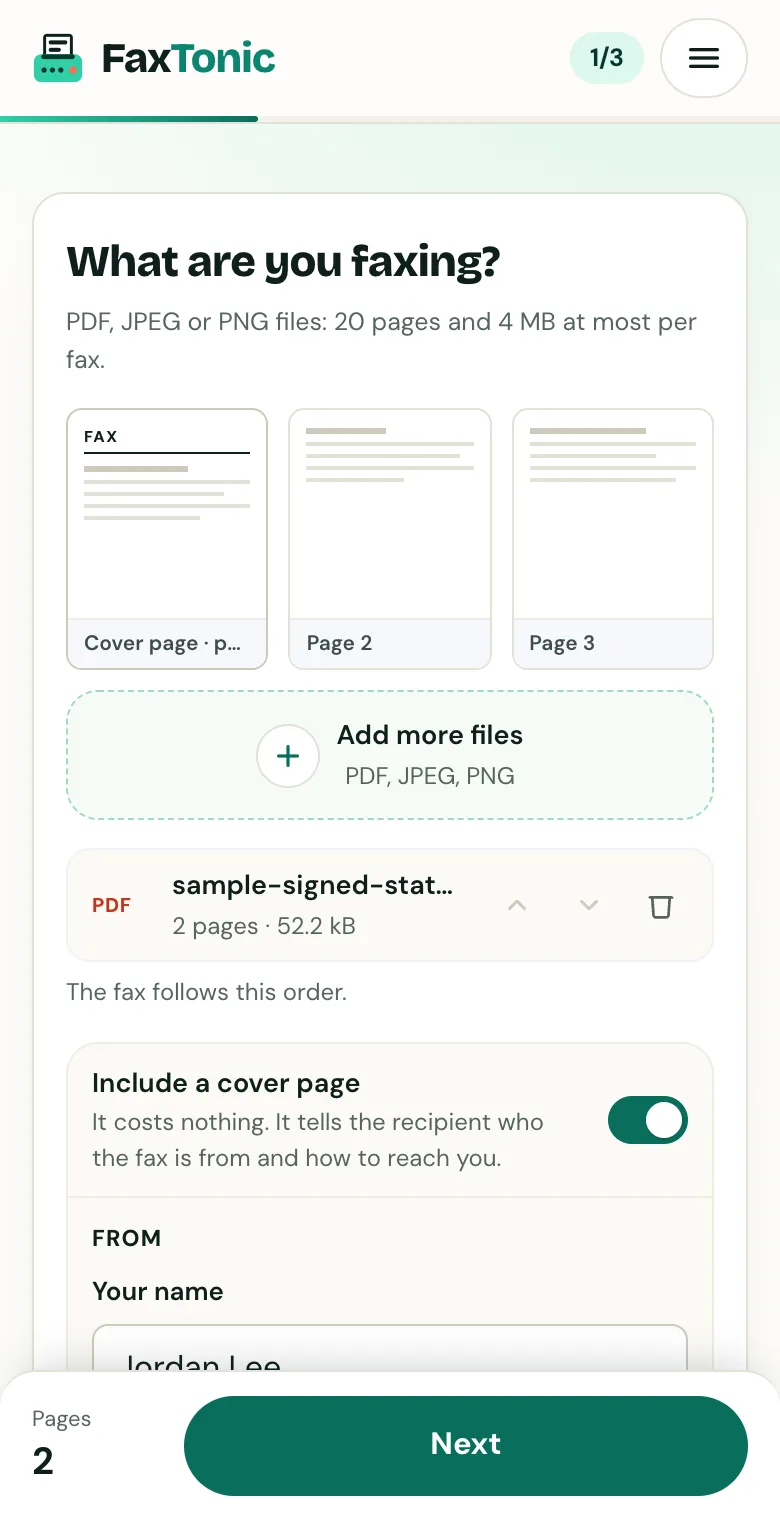
Add your file. The cover page is free, and you can turn it off.
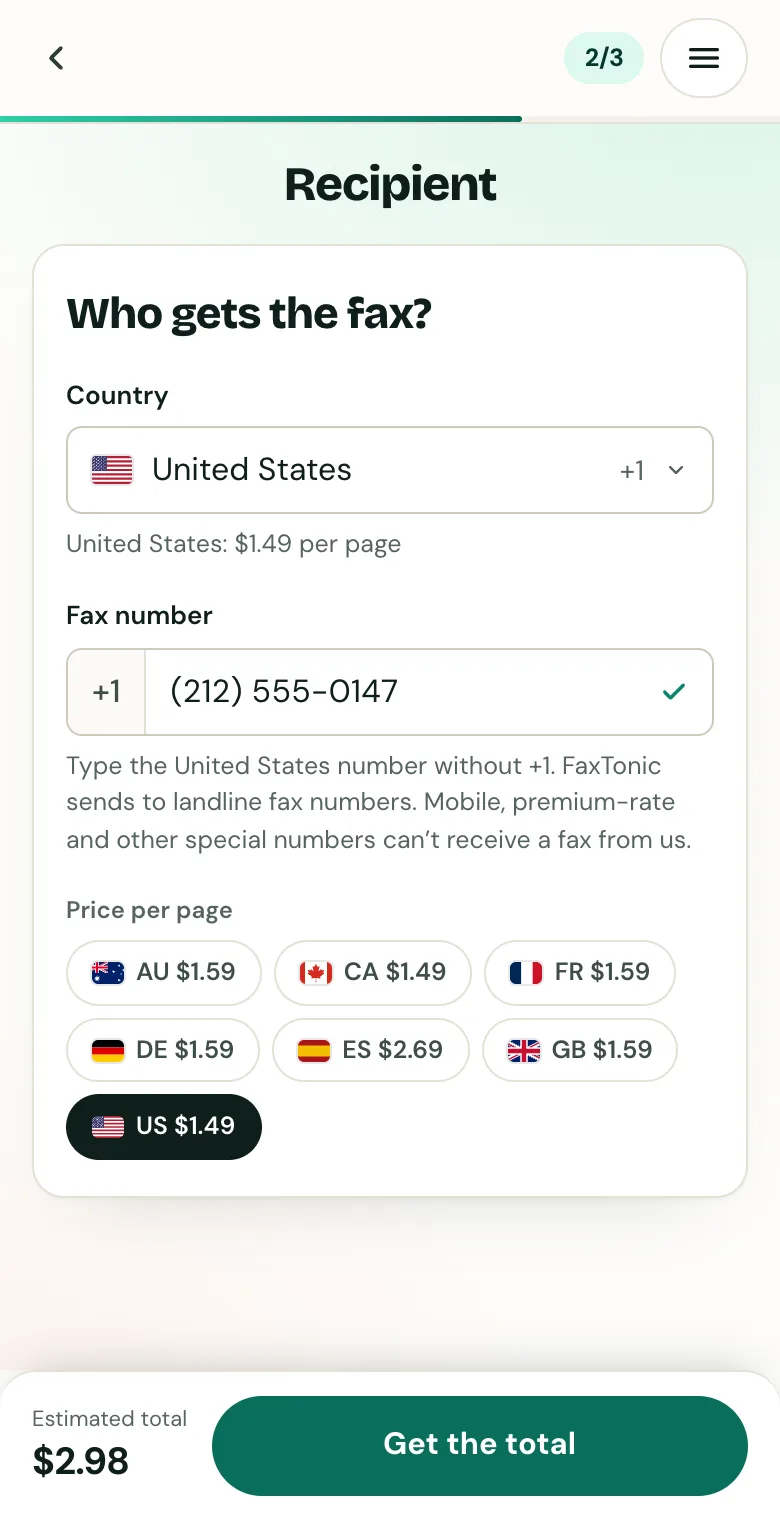
Pick the country and type the fax number.
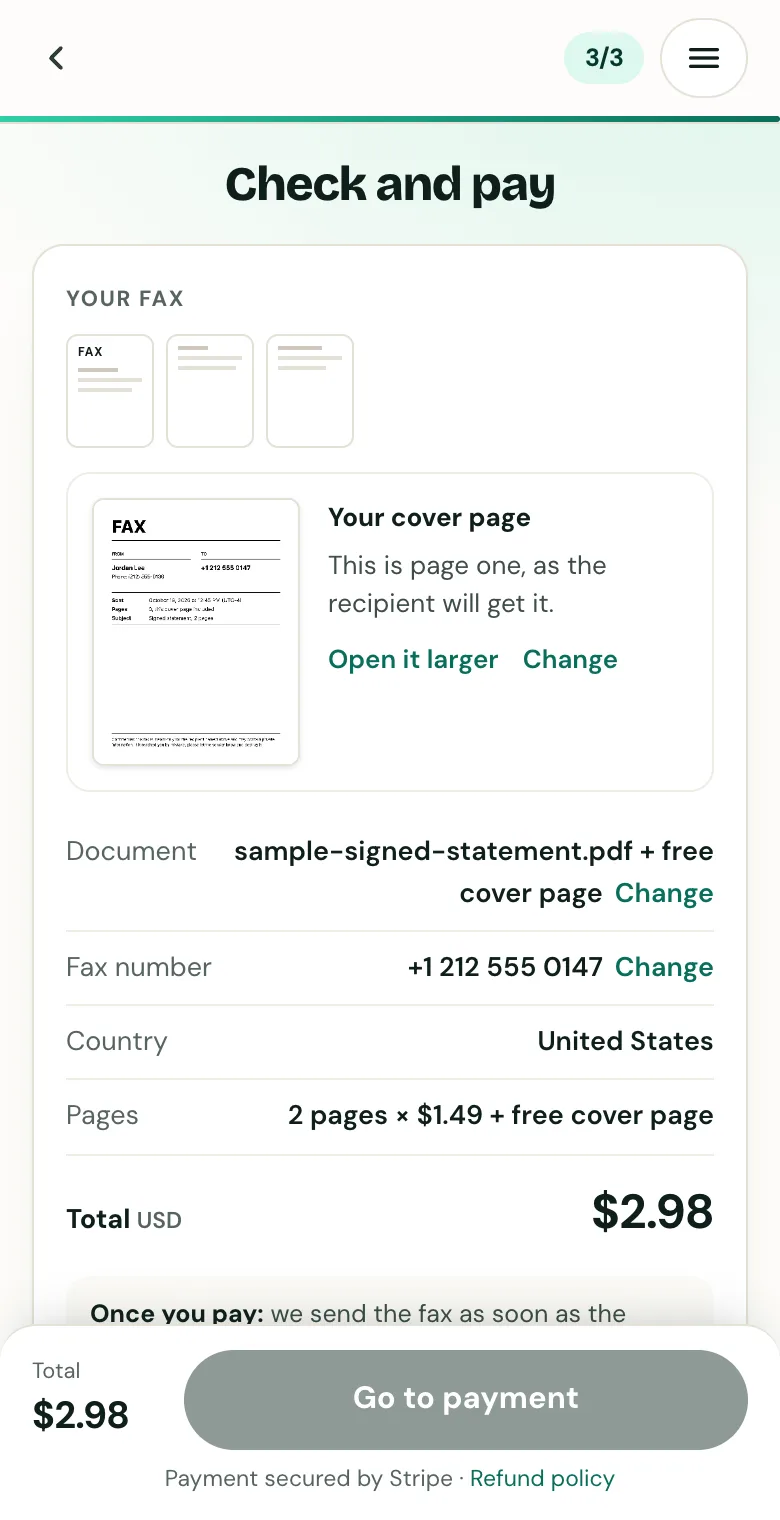
Check the cover page, the number and the total before you pay.
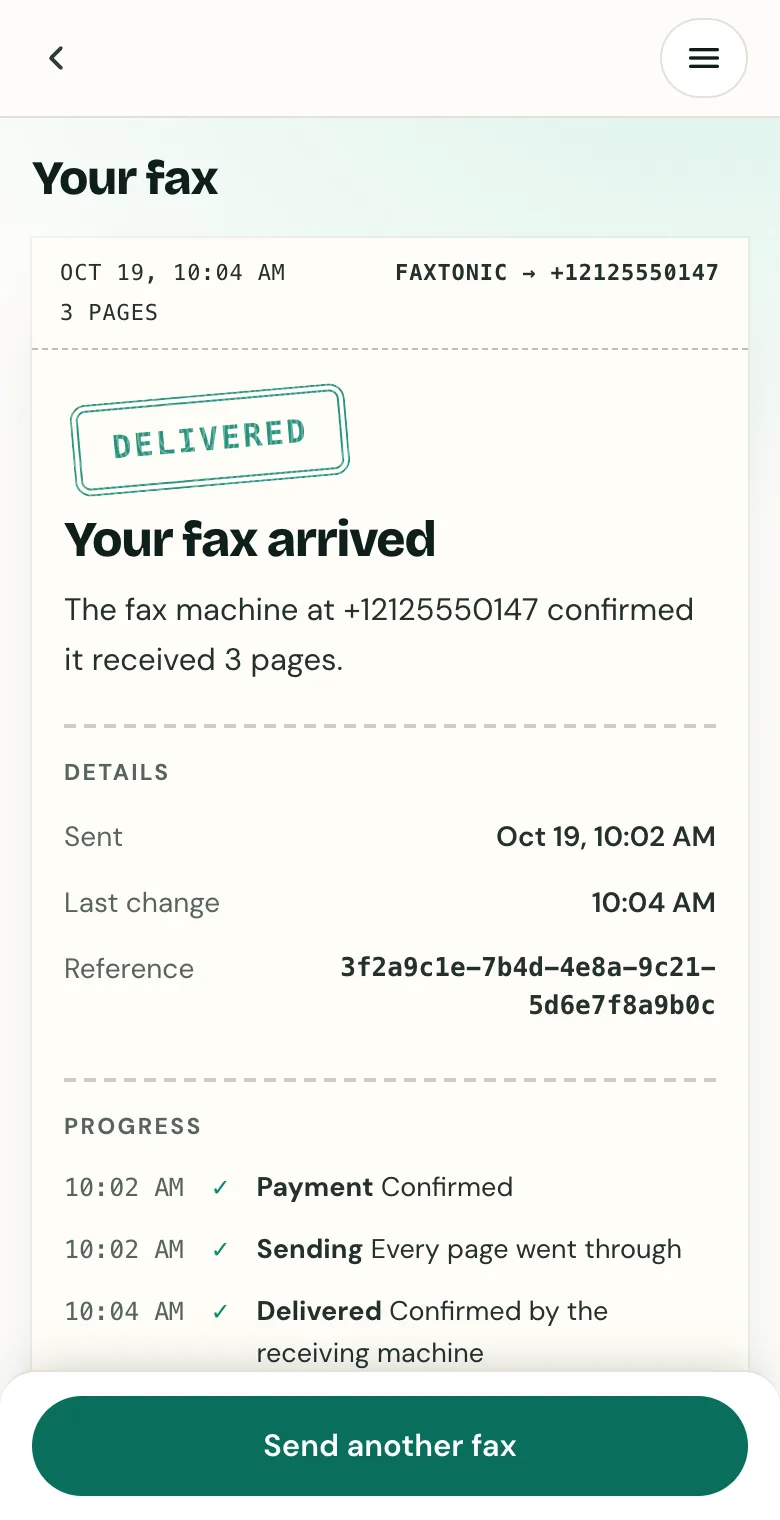
Follow your fax: the status page shows when it’s delivered.
Official sources
- VA: Compensation mailing addresses and fax numbers
- VA: How to file a VA disability claim
- VA: Applying for benefits
- VA: Supplemental Claim
- VA: Higher-Level Review
- VA: Board Appeal
- VA: Your intent to file a VA claim
- VA: Supporting forms for VA claims
- VA: Add or remove dependents
- VA: Get help from an accredited representative
- VA: Accredited representative FAQs
- VA: How to apply for a Veterans Pension
- VA: Burial allowance
- VA: How to apply for health care
- VA: How to apply for the GI Bill
- VA Form 20-0995 (PDF)
- VA Form 21-4193 (PDF)
- VA Form 10-10EZ (PDF)
- VA M21-1: date of receipt and signatures
- VA M21-1: centralized mail intake
- VA: After you file your claim
- VA: Claim status tool FAQs
- VA: Upload supporting evidence
- VA: Protecting veterans from fraud
FaxTonic is an independent fax service. It isn’t affiliated with or endorsed by any agency, insurer, court or company named in this guide. Fax numbers and rules change: when a letter or form gives you a fax number, use that one.