On this page
Appealing a determination to a referee
If you disagree with a determination from the UC Service Center, you have 21 calendar days from the determination date on the notice to appeal; the last day is printed on the determination. When the 21st day falls on a day the department is closed, the deadline moves to the next business day.
Fax your appeal to 855-728-2329 (855PAUCFAX), using form UC-46B or a letter. The department says an appeal letter must include:
- the claimant’s name and address, and the last four digits of their Social Security number;
- the claim number or the determination number, if known, and the date of the determination;
- the reason for the appeal;
- the name, mailing address, phone number and email address of the person filing it.
How the filing date is set. For a fax, it’s the date printed by the department’s receiving machine; if that isn’t legible, the date printed by the sending machine; failing both, the date the department records. The department adds that you carry the risk of any delay or interruption in the transmission and of an unreadable appeal.
You can’t file an appeal in person at a UC Service Center. The department calls online filing, in your UC account, the best option, and also takes appeals by email and mail.
Hearings before a referee
Once you’ve appealed, the referee office on your hearing notice handles the case. Send it any missing or extra documents by mail, email, fax or in person, or upload them to the appeal case file in your UC account. For a phone hearing, the department asks for documents five days in advance so they can be shared with all parties.
Written requests to the referee office, such as postponing, reopening, asking for a subpoena or withdrawing an appeal, must give the claimant’s name, the docket number, what you’re asking for and why. If you ask for a continuance and hear nothing back, the department says to assume it wasn’t granted and attend the hearing.
| Referee office | Fax number |
|---|---|
| Bethlehem | 610-746-3806 |
| Bristol | 215-781-3207 |
| Erie | 814-878-5814 |
| Franklin | 814-437-4104 |
| Greensburg | 724-830-2049 |
| Harrisburg | 717-705-0881 |
| Hermitage | 724-962-6098 |
| Johnstown | 814-533-2412 |
| King of Prussia | 610-337-1877 |
| Lancaster | 717-290-1952 |
| Philadelphia | 215-560-2816 |
| Pittsburgh | 412-565-2324 |
| Reading | 610-378-4456 |
| Scranton | 570-963-3497 |
| Springfield | 610-338-2299 |
| Wilkes-Barre | 570-301-1523 |
| Williamsport | 570-321-0917 |
Referee office staff can’t give guidance on claims.
Appealing to the Board of Review
To appeal a referee’s decision, you again have 21 calendar days from the date on the decision. Fax the appeal to the UC Board of Review at 717-346-4484, with form UC-46A or a letter giving the same details as above and the referee office’s docket number. It must be filed before midnight on the due date.
Other requests to the Board go to its Appeals System Administrator, fax 717-787-6125: withdrawing a Board appeal, asking to file a brief or for oral argument, copies of the appeal record, and reconsideration of a Board decision, which must be asked for within 15 days of the decision date.
After the Board, the next step is an appeal to the Commonwealth Court, filed with the court within 30 days of the Board’s decision date.
If your first letters never came
In your first week, the department sends three mailings: the Notice of Financial Determination (UC-44F), the claim confirmation letter (UC-360) and the claimant handbook (UCP-1). Its FAQ says that if they don’t arrive, you can fill in its fax cover sheet and fax it to the UC service centers at 717-525-5160, and a representative will call you.
What goes online, not by fax
- Fact-finding questionnaires must be completed inside your UC online account. If you don’t answer in time, the department may decide on the information it has.
- Identity verification goes through ID.me, with original documents only, no photocopies.
- Naturalized and work-authorized claimants email or mail images of the front and back of their Social Security card and work authorization within 14 calendar days.
- Federal civilian employees upload or email their supporting documents.
To tell staff you’ve uploaded documents to your dashboard, the department suggests a secure message to UCHelp@pa.gov with your full name and the last four digits of your Social Security number.
How Pennsylvania replies
Decisions come by mail or email, depending on the contact method you chose in the UC system. Referee decisions usually follow within two weeks of the hearing; Board decisions often take at least 60 to 75 days. Nothing comes back by fax.
The department warns against anyone who offers to file for you for a fee, says official sites end in pa.gov, and says it uses text messages only to tell you a UC representative is about to call.
How to fax a Pennsylvania UC appeal with FaxTonic
- Fill in form UC-46B or UC-46A, or write a letter with every detail listed above, and sign it.
- Scan it with any documents you’re adding, or photograph each page flat. FaxTonic takes PDF, JPEG, and PNG files, up to 4 MB once prepared for faxing and 20 pages per fax.
- Open FaxTonic and add your file. Keep the free cover page with your name, a phone number and “UC appeal” plus the claim or docket number in the subject.
- Choose the United States, enter the right number and check the price: $1.49 a page. Pay by card well before the deadline.
- When the status page shows the fax delivered, save a screenshot: it records the date and time you sent it, which matters when the filing date is in question.
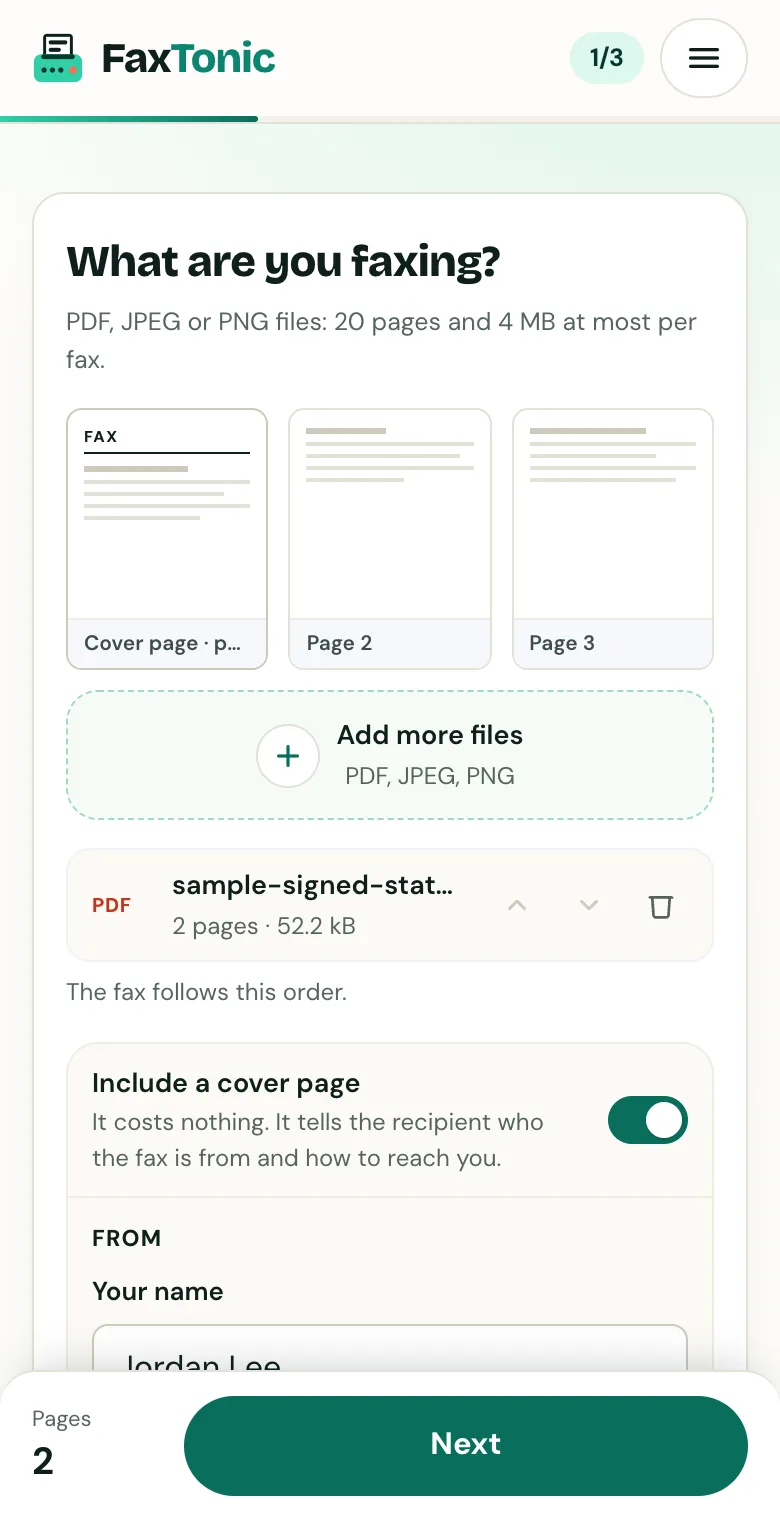
Add your file. The cover page is free, and you can turn it off.
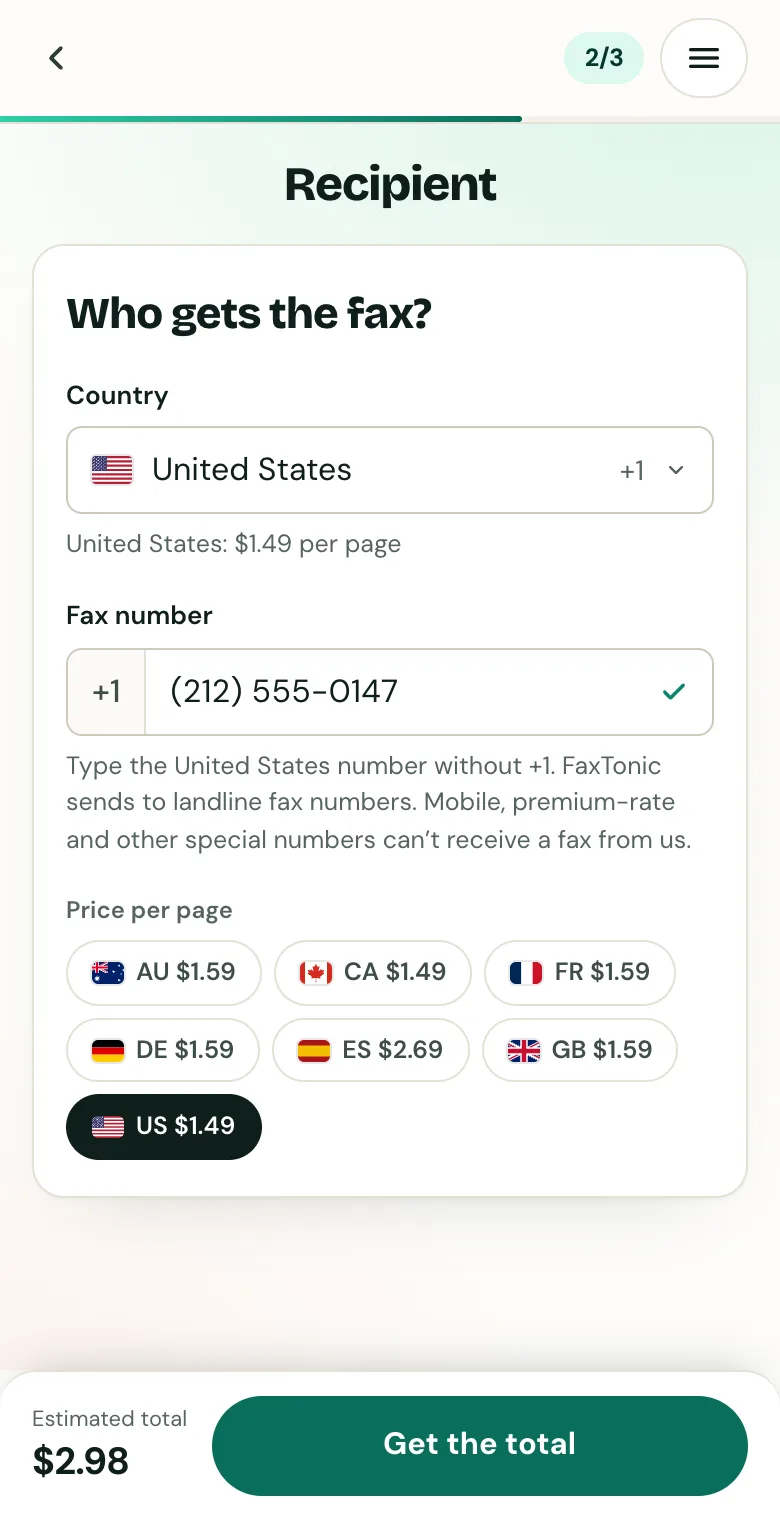
Pick the country and type the fax number.
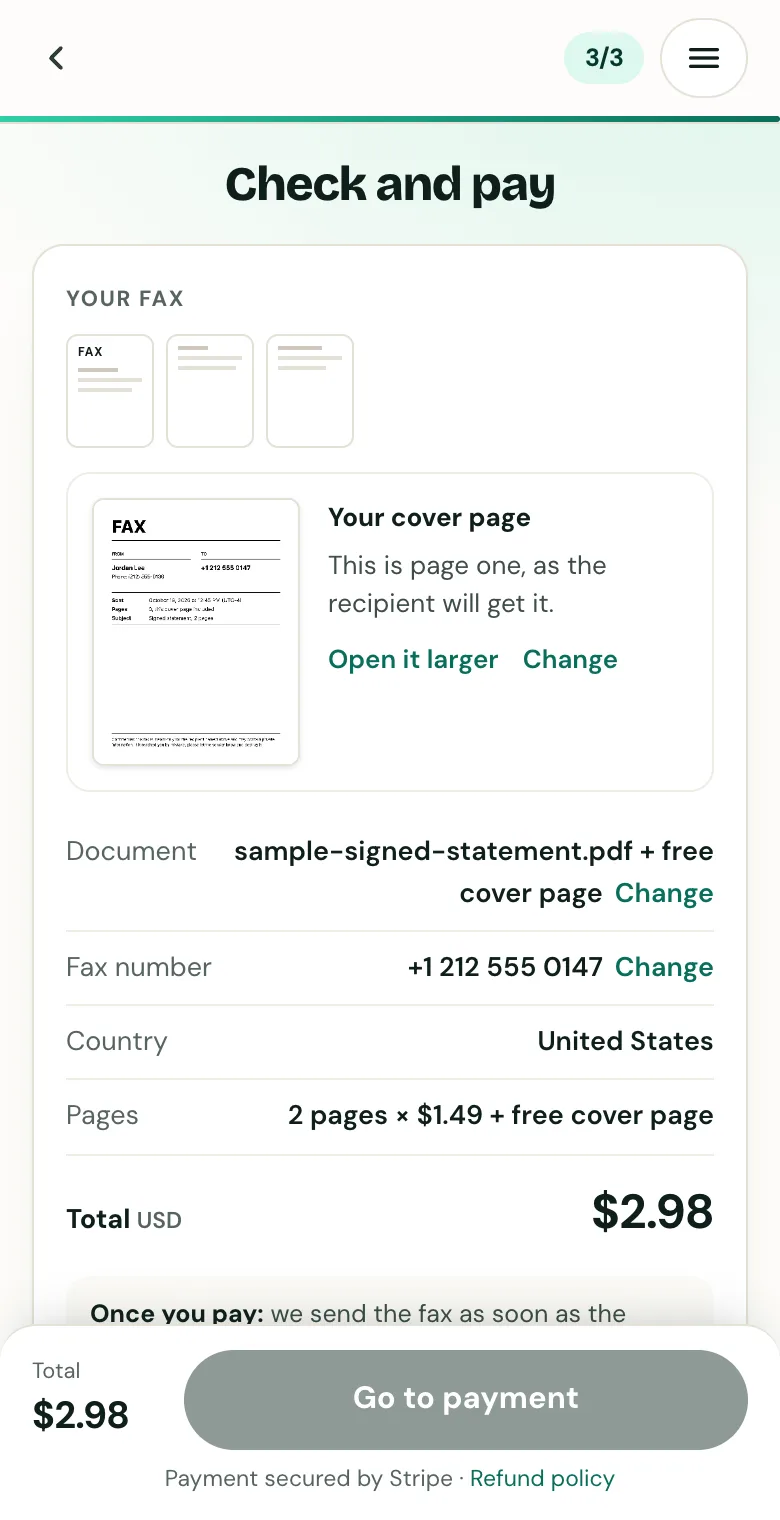
Check the cover page, the number and the total before you pay.
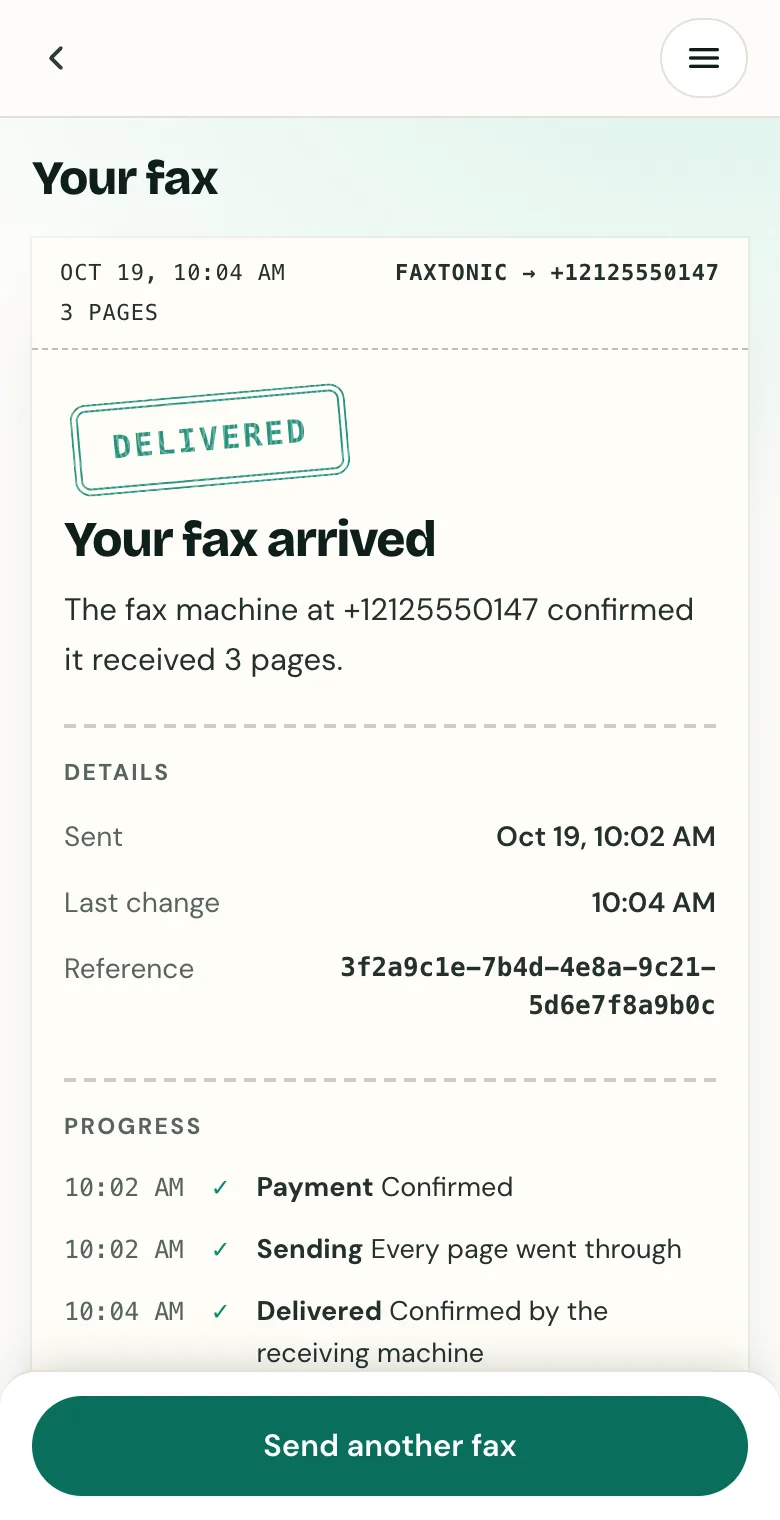
Follow your fax: the status page shows when it’s delivered.
Official sources
- Pennsylvania L&I: Appealing a determination to a UC referee
- Pennsylvania L&I: Appealing a referee decision to the UC Board of Review
- Pennsylvania L&I: Appeal information FAQs
- Pennsylvania L&I: Contact unemployment compensation
- Pennsylvania L&I: Form UC-46B (PDF)
- Pennsylvania L&I: Filing for unemployment compensation FAQs
- Pennsylvania L&I: Fact-finding user guide (PDF)
- Pennsylvania L&I: Identity verification with ID.me
- Pennsylvania L&I: Unemployment compensation fraud
FaxTonic is an independent fax service. It isn’t affiliated with or endorsed by any agency, insurer, court or company named in this guide. Fax numbers and rules change: when a letter or form gives you a fax number, use that one.