On this page
Do you need Form 4506-T?
For many individuals, the IRS’s own services are quicker. Its Get Transcript tool shows transcripts online in your IRS account, or mails a return or account transcript to the address it has on file, arriving in 5 to 10 calendar days. The same mailed transcripts can be ordered by phone at 800-908-9946.
Form 4506-T is the way to go for what those services don’t cover. The IRS points to it for:
- account transcripts for years older than the online and mail services offer;
- a verification of non-filing letter for an older year;
- return transcripts for a fiscal tax year, one that doesn’t follow the calendar year;
- business transcripts, along with the business tax account and the IRS business tax line.
Not sure which transcript you need? The form suggests the record of account, which has the most detail. And if you need a full copy of a return rather than a transcript, that’s Form 4506, which is mailed and has a fee.
Where to fax Form 4506-T
The form has two charts, and the number depends on the state you lived in, or your business was in, when the return was filed. Use the first chart for individual transcripts (Form 1040 series, W-2 and 1099) and the second for everything else. If your request covers several returns and the chart gives different numbers, send it to the number for the address on your most recent return.
| Fax number | If you lived in |
|---|---|
| 855-587-9604 (Austin) | Alabama, Arizona, Arkansas, Florida, Georgia, Louisiana, Mississippi, New Mexico, North Carolina, Oklahoma, South Carolina, Tennessee or Texas; another country; a US territory; or an APO or FPO address |
| 855-821-0094 (Kansas City) | Connecticut, Delaware, the District of Columbia, Illinois, Indiana, Iowa, Kentucky, Maine, Maryland, Massachusetts, Minnesota, Missouri, New Hampshire, New Jersey, New York, Pennsylvania, Rhode Island, Vermont, Virginia, West Virginia or Wisconsin |
| 855-298-1145 (Ogden) | Alaska, California, Colorado, Hawaii, Idaho, Kansas, Michigan, Montana, Nebraska, Nevada, North Dakota, Ohio, Oregon, South Dakota, Utah, Washington or Wyoming |
| Fax number | If you or your business were in |
|---|---|
| 855-298-1145 (Ogden) | Alabama, Alaska, Arizona, Arkansas, California, Colorado, Florida, Hawaii, Idaho, Iowa, Kansas, Louisiana, Minnesota, Mississippi, Missouri, Montana, Nebraska, Nevada, New Mexico, North Dakota, Oklahoma, Oregon, South Dakota, Texas, Utah, Washington or Wyoming; another country; a US territory; or an APO or FPO address |
| 855-821-0094 (Kansas City) | Connecticut, Delaware, the District of Columbia, Georgia, Illinois, Indiana, Kentucky, Maine, Maryland, Massachusetts, Michigan, New Hampshire, New Jersey, New York, North Carolina, Ohio, Pennsylvania, Rhode Island, South Carolina, Tennessee, Vermont, Virginia, West Virginia or Wisconsin |
Several states sit in different rows of the two charts, Michigan and Ohio for example, so check the chart that matches your transcript.
Filling it in so it isn’t rejected
- 120 days. The IRS must receive the form within 120 days of the date you sign it. A pre-dated or future-dated signature isn’t valid either.
- Tick the box beside the signature, which confirms you have authority to request the information. The form says it won’t be processed without it.
- Sign last. The form warns not to sign until every line that applies is complete, and an incomplete or illegible request may be rejected. Don’t alter it after signing: the IRS manual counts crossings-out, correction fluid and pasted-in parts as alterations.
- Sign by hand. The IRS manual says a photocopy of a signature is acceptable on these requests, but an electronic or stamped one isn’t.
- One form number per request on line 6, and the end date of each tax year or period on line 9, written as mm/dd/yyyy. A verification of non-filing for the current year can be requested only after June 15.
- Line 1b: your SSN or ITIN for an individual return, even one with a Schedule C; the EIN only for a business return. The optional customer file number on line 5 is up to 10 digits and must not contain an SSN.
- Use a current form. The IRS manual says requests on revisions older than June 2023 aren’t processed.
Who signs: the taxpayer on line 1a or 2a. For a joint return, either spouse can sign alone, using the name as it appeared on the return, and the current name too after a name change. A representative can sign only if Form 2848 delegates that power on line 5, and must attach it.
Where the transcript goes
The IRS mails transcripts only to your address of record, and says it doesn’t fax transcripts for security reasons. It also won’t mail them to a third party named on Form 4506-T, and the manual says requests to send a transcript to a third party are rejected. A third party that can’t use a transcript mailed to you, such as a lender, can get it through the IRS’s Income Verification Express Service (IVES) instead.
Moved since your last return? File Form 8822 with your new address before you send Form 4506-T: the IRS says a transcript sent to an old address won’t be forwarded, and a change of address takes four to six weeks to process.
The form says most requests are processed within 10 business days.
Your transcript arrives by mail, never by fax, so FaxTonic’s send-only faxing is all you need here.
How to fax Form 4506-T with FaxTonic
- Download the current Form 4506-T from irs.gov, complete it, tick the box by the signature, then sign and date it.
- Scan or photograph the signed form, with Form 2848 if a representative signed. FaxTonic takes PDF, JPEG, and PNG files, up to 4 MB once prepared for faxing.
- Open FaxTonic and add your file. The cover page is free and optional; if you keep it, put “Form 4506-T” in the subject.
- Choose the United States and enter the number from the chart that matches your transcript. The price shows before you pay: $1.49 a page.
- Pay by card, and keep a screenshot of the status page once it shows the fax delivered. Then wait for the transcript in the mail.
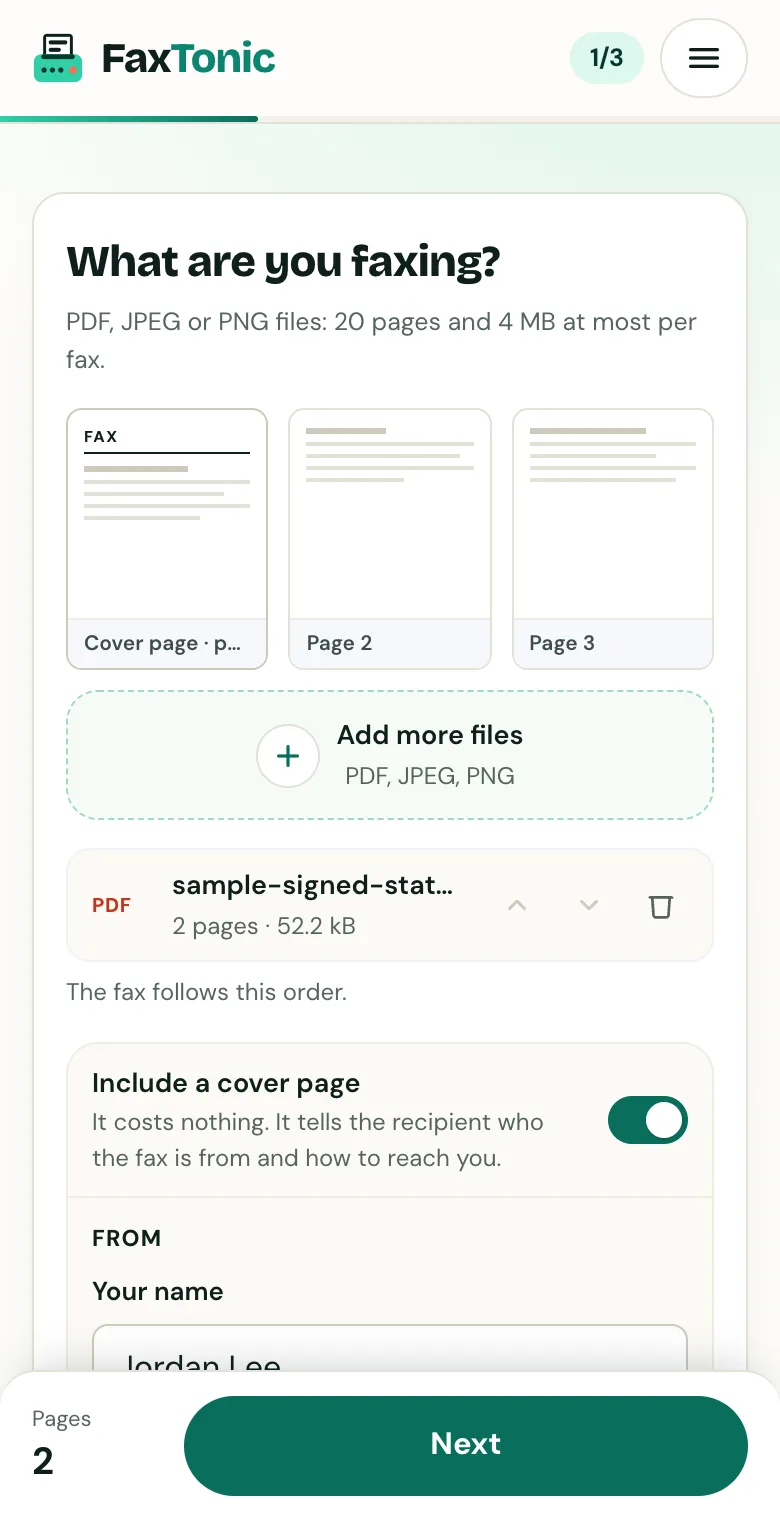
Add your file. The cover page is free, and you can turn it off.
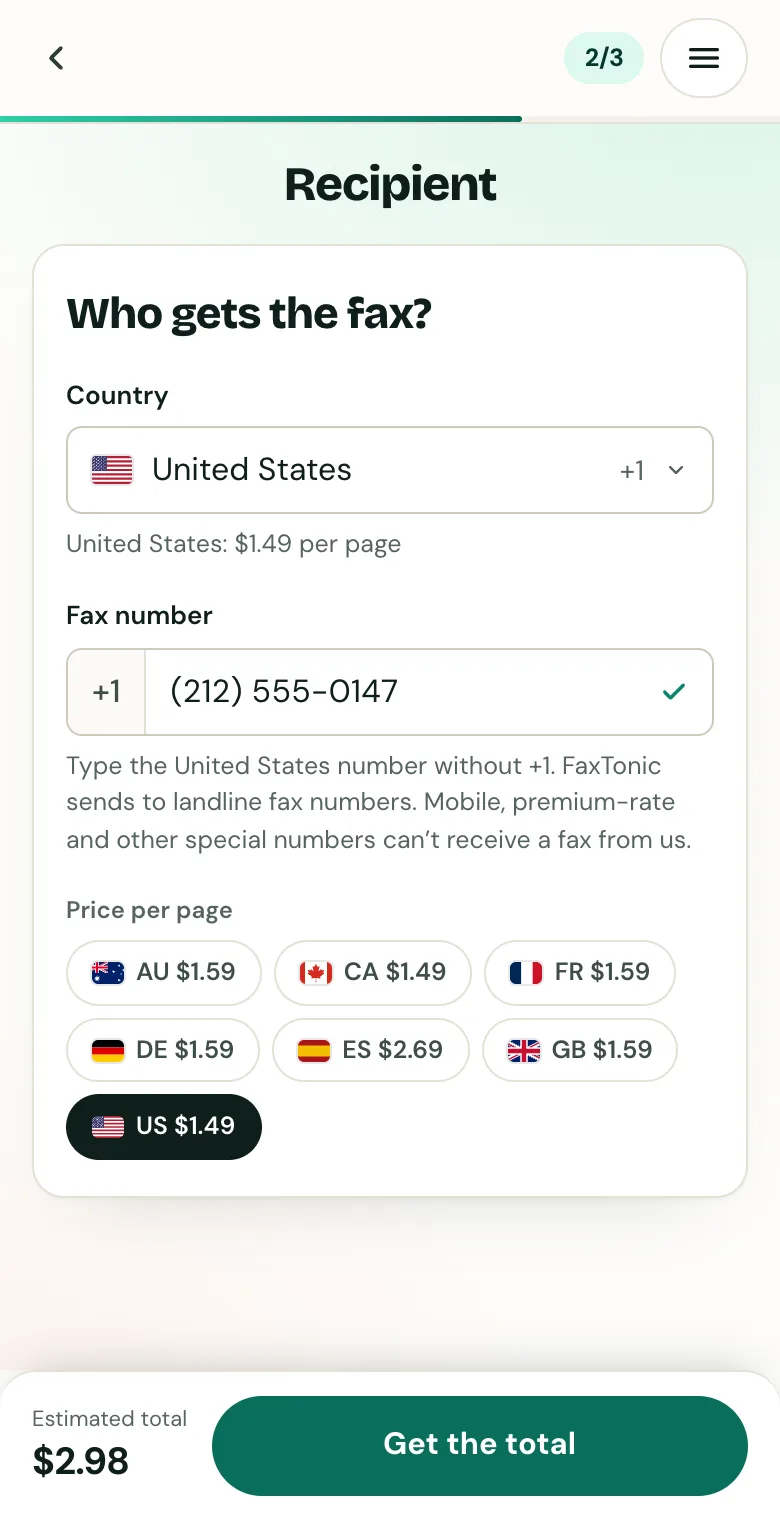
Pick the country and type the fax number.
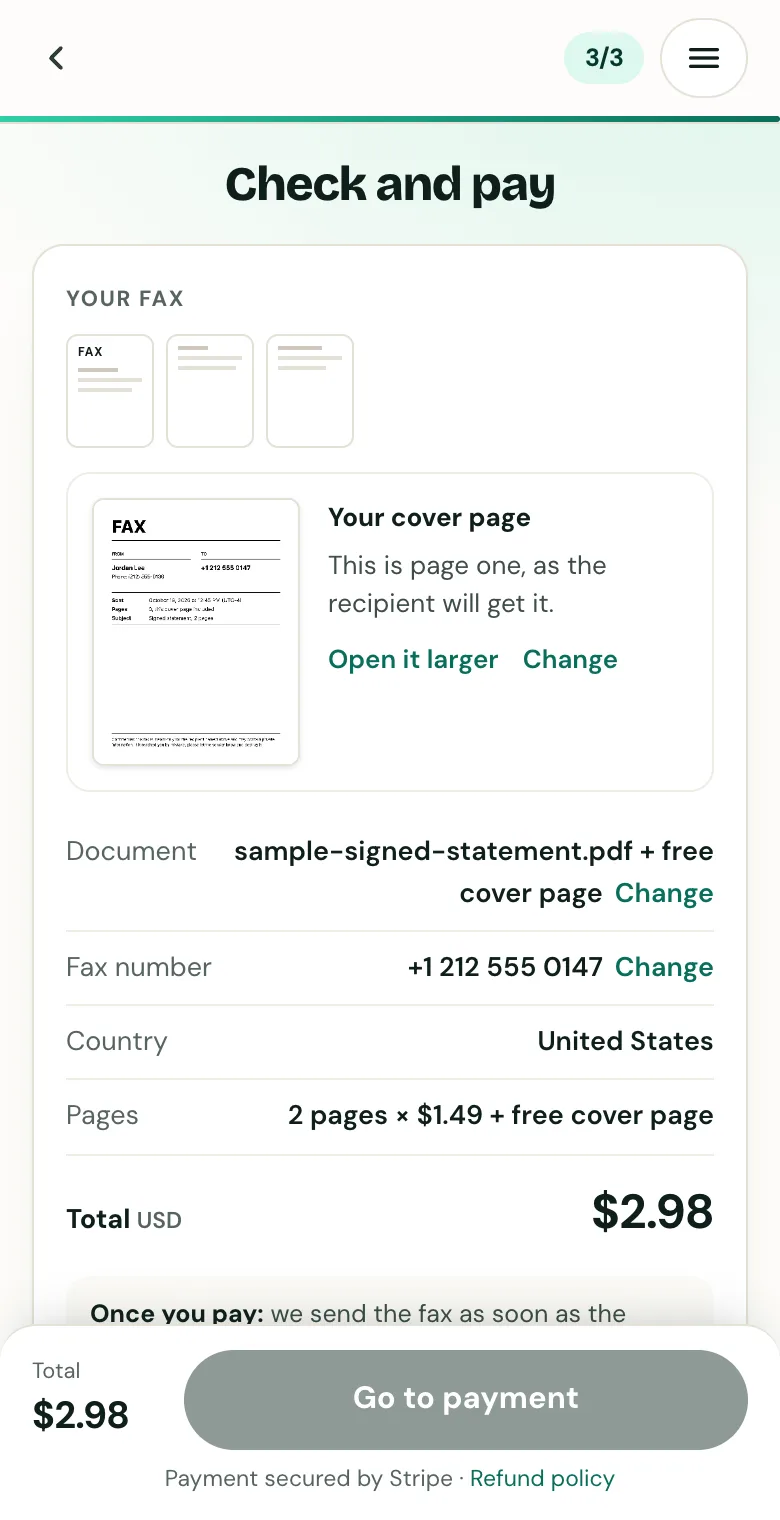
Check the cover page, the number and the total before you pay.
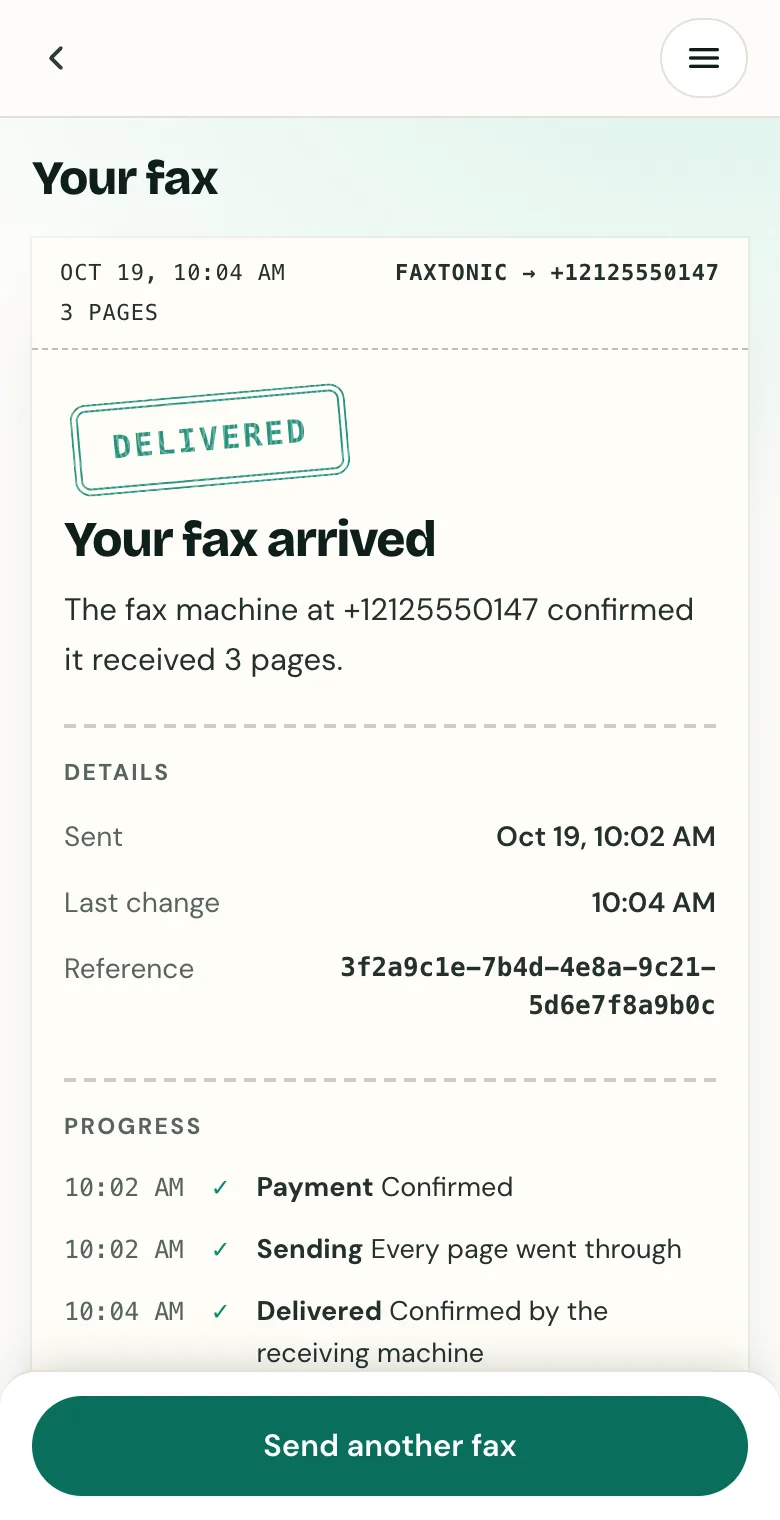
Follow your fax: the status page shows when it’s delivered.
Official sources
- IRS: Form 4506-T and its instructions (PDF)
- IRS: About Form 4506-T
- IRS: About tax transcripts
- IRS: Get Transcript
- IRS: Transcript types for individuals and ways to order them
- IRS: Transcript services for individuals, FAQs
- IRS: Get a business tax transcript
- Internal Revenue Manual 3.5.21, transcript and return requests
FaxTonic is an independent fax service. It isn’t affiliated with or endorsed by any agency, insurer, court or company named in this guide. Fax numbers and rules change: when a letter or form gives you a fax number, use that one.